System Access Control
Regulating access to a control system is an important component of the defense-in-depth approach to cybersecurity.
External authentication and authorization using the Remote Authentication Dial-In User Service (RADIUS) provides secure access via Remote Access Services (RAS) and Virtual Private Networks (VPNs), offering security while enabling remote access.
Select from the options below to display the details required:
 External Authentication with RADIUS
Authentication, authorization, and accounting (AAA) protocols authenticate users before:
-
Granting access to network assets.
-
Authorizing them for particular assets.
-
Accounting for use of those assets.
AAA is commonly used for access to trusted networks.
RADIUS is an AAA protocol commonly used in control systems and has the following advantages:
-
It is a client-server protocol that provides centralized and scalable user management where network devices might number in the hundreds or more.
-
It can substantially increase the number of supportable user accounts when embedded devices, for example, switches, production activity controls (PACs) or firewalls have the storage capacity to handle only a few user accounts.
-
It can help enforce consistency in security policy and user access.
-
It can help with account management by providing a single location for all accounts.
-
RADIUS clients are supported by many VPN servers, remote access servers, wireless access points, switches, routers and other network access devices.
A RADIUS server is typically a process running on a Windows or UNIX system, for example, Windows Server offers a RADIUS server called Network Policy Server (NPS). In a secure network architecture, locate any dedicated RADIUS servers within the demilitarized zone (DMZ). Some network devices also offer RADIUS servers.
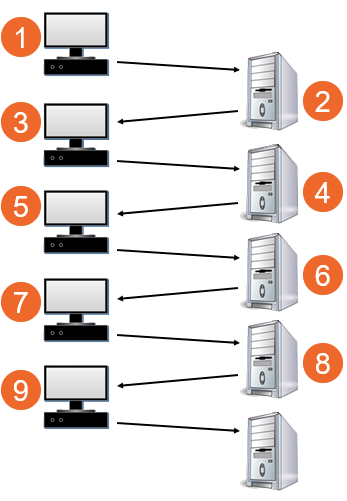
Transactions between the RADIUS client and the RADIUS server are authenticated with a shared secret, which is typically a password or pass code:
|
|
Alternatives to RADIUS include Terminal Access Controller Access-Control System (TACACS), TACACS+ and Diameter protocols. These are more commonly found on PC servers and clients than on embedded devices, for example, switches, PACs and firewalls. TACACS+ and Diameter are Transmission Control Protocol (TCP) based and support Internet Protocol Security (IPsec) and Transport Layer Security (TLS) protocols.
RADIUS Authentication Vulnerabilities
The communication of user credentials between the RADIUS client and server is not strongly encrypted. The impact of weak encryption is mitigated by a strong perimeter if the RADIUS server and client reside on the same internal network and that network is separated by a DMZ.
RADIUS does not encrypt transferred attribute values, this can potentially expose identifiable network elements. If the RADIUS server needs to proxy requests through untrusted networks or if the client and server are separated by untrusted networks, then use IPsec VPNs, see Remote Access Control with Virtual Private Network (VPN) for details.
RADIUS Authentication Guidelines
-
Use a different shared secret for each RADIUS server and client pair.
-
If possible, configure shared secrets with a minimum length of 16 characters consisting of a random sequence of upper-case and lower-case letters, numbers and punctuation.
-
Implement RADIUS authentication on firewalls and wireless devices if there are many devices supporting RADIUS.
-
For a firewall use group authentication:
-
Group authentication allows the assignment of multiple users to groups via a RADIUS server. If the group authentication is active and an unknown person logs in to the user firewall, the firewall checks the user's authenticity via the RADIUS server. If the authentication is successful, and the firewall has a user firewall account with this group name, the firewall gives the user access. This is particularly important for vendors that perform maintenance on the network. Using external authentication with groups enabled provides a more secure way of allowing temporary bypass of normal firewall rules. This is also useful for defining user-based rules so software or firmware can be downloaded to critical equipment without the need to open high-risk ports in the normal firewall table.
-
The credentials of the externally authenticated user should be entered and present in the user firewall accounts.
-
Remote Access Control with Virtual Private Network (VPN)
Many organizations allow engineers and support personnel to monitor and control their system from remote locations. Remote access to a control network The portion of the control system network where process data is transferred, including Supervisory Control and Data Acquisition
(SCADA) to Programmable Automation Controller (PAC) traffic and PAC to PAC traffic can be susceptible to cyber-attacks if not configured correctly. Virtual Private Networks (VPN) can be used for providing and managing remote access.
Virtual Private Network (VPN)
A VPN provides security through encryption and authentication, helping to protect the data as it moves over the internet. A VPN client uses the internet to create a virtual point-to-point connection with a remote VPN server.
Commonly used VPN technologies include:
-
Secure Socket Layer (SSL) - VPN technology based on SSL can use a web browser or client implementation. It is a common protocol built into most web browsers, easier to configure than IPsec and does not require special client software. SSL works for web-based (TCP) applications and supports Digital Signature and data encryption.
-
Internet Protocol Security (IPsec) - This provides more of the security features required for remote access to industrial control systems. It is transparent to the application and uses Internet Protocol (IP) network-layer encryption to provide private, secure communications over IP networks. IPsec supports network level data integrity, data confidentiality, data origin authentication and replay protection. IPsec supports both digital signature and secret key algorithm:

IPsec is a suite of standards for performing encryption, authentication and secure tunnel set up, it essentially creates private end-to-end tunnels out of the public bandwidth available on the internet.
IPsec uses the following components:
-
Internet key exchange (IKE and IKEv2)
-
Encapsulating Security Payload (ESP)
IPsec can be used in:
-
Transport mode - Connections are host-to-host, only the data payload of the IP packet is encrypted and/or authenticated.
Note - If Network Address Translation (NAT) is used, NAT Traversal (NAT-T) is required. -
Tunnel mode - Connections can be established using the following architectures:
-
Gateway to host
-
Host-to-host
The entire IP packet is encapsulated to help provide a virtual secure hop between two gateways and a secure tunnel across an untrusted internet.
IPsec VPN tunnel uses algorithms to encrypt and decrypt user information. The three common encryption protocols are:
-
Advanced Encryption Standard (AES) - Strong encryption, recommended.
-
Data Encryption Standard (DES) - Weak encryption and should not be used.
-
Triple-DES (3DES) - Effectively doubles encryption strength over DES.
Encrypted communication cannot be analyzed and filtered by firewalls, so if the host at one end of a VPN tunnel is compromised, it compromises the other end.
A one-way encryption algorithm known as a hash takes an input message of arbitrary length and produces a fixed-length output message. Hash algorithms are used by Internet Key Exchange (IKE), Authentication Header (AH), and Encapsulating Security Payload (ESP) to authenticate data. Popular hash algorithms include:
-
Secure Hash Algorithm 2 and 3 (SHA-2 and SHA-3) - Recommended.
-
SHA-2 (256-bit) and SHA-3 (512-bit) - offers good encryption.
-
Secure Hash Algorithm 1 (SHA-1) - Not recommended. This generates a 160-bit (20-byte) message digest. It is slower than MD5 but offers greater protection against brute force attacks. After the inception of the SHA-1 algorithm, SHA-1 was compromised.
-
Message Digest 5 (MD5) - Not recommended. A 160-bit key. After the inception of MD5, the hash algorithm was compromised.
Remote Access Vulnerabilities
Remote access is vulnerable to:
-
Inadequate access restriction.
-
Firewall filtering deficiencies.
-
Services allowed into the control system network.
-
War dial-ups - computer dialing consecutive telephone numbers seeking modems and servers.
-
Connection passwords programmed with vendor's default password.
-
Access links not protected with authentication and/or encryption.
-
Remote host security policies not present or up to date.
-
Wireless has additional challenges because radio waves propagate outside the intended area:
-
Attackers who are within range can hijack or intercept an unprotected connection.
-
Wardriving, the act of searching for Wi-Fi wireless networks from a moving vehicle, typically using a laptop or smartphone. It can involve mapping access points and is often associated with security risks, as it may allow unauthorized access to private networks.
-
Remote Access Guidelines
-
Approve and install remote access enabling hardware and software in strict accordance with security policies.
-
Disable remote access when not needed. Enable it only when access is required, approved and authenticated. Consider process risk when allowing remote access.
-
Change the password immediately after a remote maintenance session is terminated.
-
For remote connections via dial-up modem or over the internet, use an encrypted protocol, for example, IPsec. Once connected, request a second authentication at the control network firewall using a strong mechanism, for example, a token-based multi-factor authentication scheme.
-
Automatically lock accounts or access paths after a preset number of consecutive invalid password attempts.
-
Change or delete any default passwords or User IDs and change passwords periodically.
-
For remote access modems, change default settings as appropriate:
-
Set dial-out modems to not auto answer.
-
Increase ring count before answer.
-
Use inactivity timeout if available.
-
Use callback whenever possible.
-
-
Weigh the benefits of VPN usage against potential impacts.
-
Configure the firewall for a VPN connection using a tunnel network-to-network configuration. Security guidelines apply to both ends of the VPN.
Access for Remote Control
Some applications require remote control and in some cases, the latency The delay incurred by an Ethernet switching or bridging device between receiving and forwarding the frame introduced by a firewall can be unacceptably high for the remote-control application. Therefore, remote access for remote control is sometimes allowed without going through a firewall. In this scenario, a security risk analysis by the organization is essential to balance risk versus functionality.
Remote control with wireless brings additional security challenges. When remote control via wireless is needed, the recommended approach is to use VPN tunnel with IPsec. Configure firewall rules to allow connection via a VPN tunnel. For example, to allow a VPN dial-in to the switch acting as a VPN gateway, configure a firewall rule allowing incoming messages from a client to the network.
Secure remote access solutions include:
-
Multi-factor authentication (MFA)
-
Single sign-on (SSO)
-
Endpoint security
-
Identity and Access Management (IAM) solutions
-
Secure remote-access Virtual Private Network (VPN)
-
Secure service edge (SSE)
-
Network access control (NAC)
-
Secure access service edge (SASE)
Wi-Fi Remote Control Vulnerabilities
The IEEE 802.11 standards govern wireless networking transmission methods. They define the architecture, medium access control (MAC) and physical layer (PHY) specifications for wireless local area network (LAN A data communications system consisting of a group of interconnected computers, sharing applications, data, and peripherals) communication. Vulnerabilities associated with IEEE 802.11 wireless include:
-
Security settings either not configured or configured for poor security.
-
Radio waves that propagate outside the intended area.
-
Vulnerability to eavesdropping.
-
Physical locations that permit easy access.
-
Lack of security polices for setting up a wireless network.
-
Attackers who are within range can hijack or intercept an unprotected connection, or ’signal jam’ for which there is no countermeasure.
-
Wardriving, the act of searching for Wi-Fi wireless networks from a moving vehicle, typically using a laptop or smartphone. It can involve mapping access points and is often associated with security risks, as it may allow unauthorized access to private networks.
NIST Wireless Guidelines
The following wireless local area network (WLAN) guidelines were published by the National Institute of Standards and Technology (NIST) in its Special Publication 800-82: Guide to Industrial Control Systems:
-
Prior to installation, a wireless survey should be performed to determine antenna location and strength to minimize exposure of the wireless network. The survey should consider the fact that attackers can use powerful directional antennas, which extend the effective range of a wireless LAN beyond the expected standard range. Faraday cages and other methods are also available to minimize exposure of the wireless network outside of the designated areas.
-
Wireless users' access should use IEEE 802.1x authentication using a secure authentication protocol (e.g., Extensible Authentication Protocol [EAP] with TLS [EAP-TLS]) that authenticates users via a user certificate or a Remote Authentication Dial In User Service (RADIUS) server.
-
The wireless access points and data servers for wireless worker devices should be located on an isolated network with documented and minimal (single if possible) connections to the Internet connection sharing (ICS) network.
-
Wireless access points should be configured to have a unique service set identifier (SSID), disable SSID broadcast
Messages that are sent out to all devices on the network, and enable MAC filtering at a minimum. -
Wireless devices, if being used in a Microsoft Windows ICS network, should be configured into a separate organizational unit of the Windows domain.
-
Wireless device communications should be encrypted and integrity-protected. The encryption should not degrade the operational performance of the end device. Encryption at Open systems interconnection (OSI) Layer 2 should be considered, rather than at Layer 3 to reduce encryption latency
The delay incurred by an Ethernet switching or bridging device between receiving and forwarding the frame. The use of hardware accelerators to perform cryptographic functions should also be considered. -
For mesh networks, consider the use of broadcast key versus public key management implemented at OSI Layer 2 to maximize performance. Asymmetric cryptography should be used to perform administrative functions, and symmetric encryption should be used to secure each data stream as well as network control traffic. An adaptive routing protocol should be considered if the devices are to be used for wireless mobility. The convergence time of the network should be as fast as possible supporting rapid network recovery in the event of a detected failure or power outage. The use of a mesh network may provide fault tolerance through alternate route selection and pre-emptive fail-over of the network.
Internal Access for Service or Vendor Personnel
Before allowing any computer to communicate in an industrial control network The portion of the control system network where process data is transferred, including Supervisory Control and Data Acquisition
(SCADA) to Programmable Automation Controller (PAC) traffic and PAC to PAC traffic, check that it is properly configured and protected and free of malware.
At a minimum, manually check that all applications, operating systems and anti-virus software are at the latest patch levels.
Consider the use of Network Access Control (NAC) systems to perform security checks automatically. A NAC can control access to a network by applying a set of rules to a device when it first attempts to access the network. These rules typically regulate anti-virus protection level, applications, operating system patch levels and configuration. They may also integrate the automatic remediation process (fixing non-compliant computers before allowing access) into the network systems before communication is allowed.
NAC systems control access to a network with policies, including pre-admission endpoint security policy checks and post-admission controls over where users and devices can go on a network and what they can do.
Mainly used for endpoint health checks, NAC systems are often used with role-based access policies. Depending on a person's profile and the result of a posture or health check, access to the network is either granted or denied.
A major benefit of using a NAC solution is the ability to block access by devices that lack appropriate anti-virus software, application patch levels or host intrusion prevention software. Such devices would otherwise place devices on the network at risk of cross-contamination.
NAC support is available in many current operating systems.
Last update - February 2026