An Example of Network Security Architecture
Based on the defense-in-depth recommendations, see Securing Operational Technology (OT) Systems and Defense in Depth for details, the following details how to apply the recommendations to a typical network architecture by providing expanded detail on:
-
Security zones
-
Location and function of firewalls
-
Data flow between security zones
-
Device security settings
Select from the options below to display the details required:
 Security Architecture Overview
The following example shows a baseline network architecture:
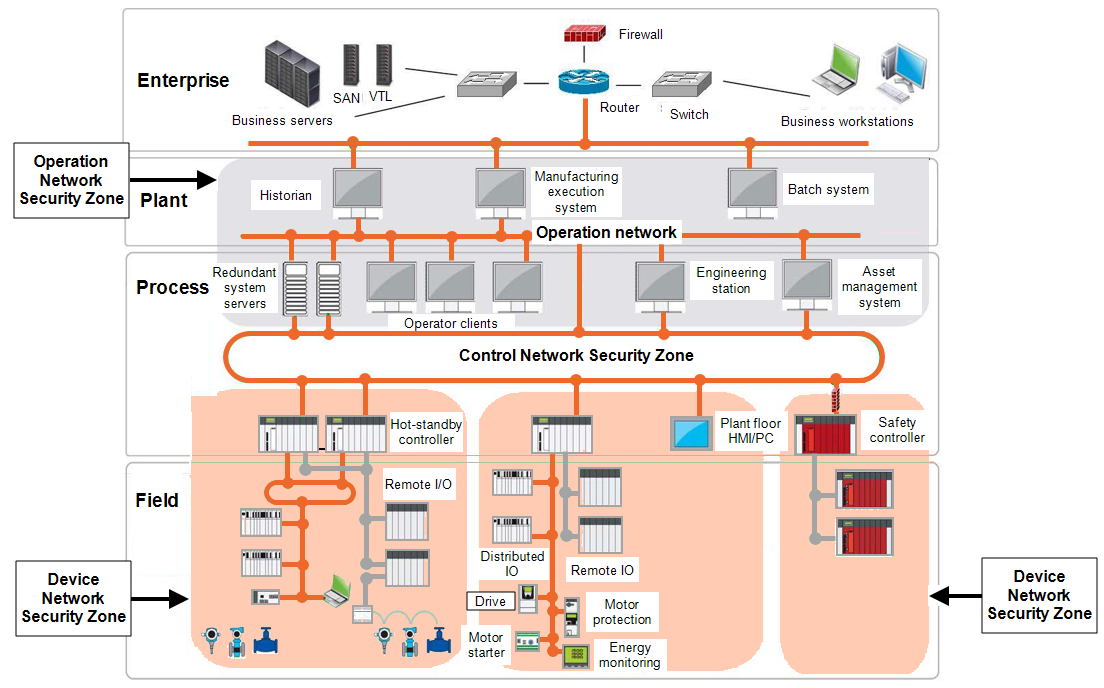
This architecture is separated into the following networks:
-
Operations network
-
Device networks.
Each of these networks is defined as a security zone. Each of the functional units in the device network security zone is a different subnet. The functional unit subnet netmask is sized slightly higher than the actual number of host A node on a network, for example, a computer, that can be logged into and used interactively device in the functional unit. The Internet Protocol (IP) addresses of any cameras are in the same subnet range as the functional unit in which they are located. To increase the security level, cameras are placed in a virtual local area network (VLAN An implementation in some managed Ethernet switches to group ports and nodes based on IEEE 802.1Q tags. This allows isolating network traffic and reduces Ethernet collision domains, resulting in better performance and deterministic system behavior) and subnet separate from the other devices in the functional area.
Security Zones
Communication between the different zones happens through pathways or conduits in which the firewalls reside. The conduits allow:
-
Control over access to zones.
-
Limit propagation of malware.
-
Resist denial of service attacks.
-
Maintain the integrity and confidentiality of network traffic.
Place the stateful industrial firewalls at the demarcations between the enterprise network and the demilitarized zone (DMZ), between the DMZ and operations network and between the operations network and the control network The portion of the control system network where process data is transferred, including Supervisory Control and Data Acquisition
(SCADA) to Programmable Automation Controller (PAC) traffic and PAC to PAC traffic.
For the boundaries between the control network and the device network, use an industrial firewall. An industrial firewall provides the additional deep packet inspection of industrial protocols. Firewalls restrict the network traffic between the security zones.
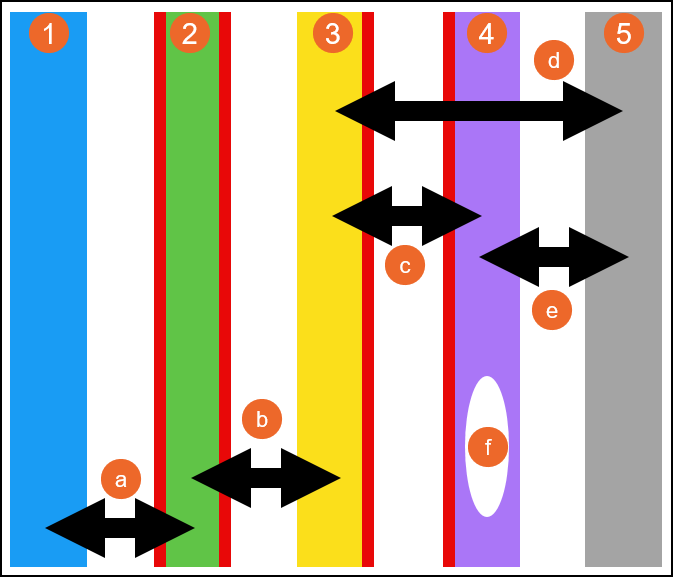
The following example, shows the types of network traffic allowed to traverse between different networks:
|
|
Industrial Firewalls
Industrial firewalls should be configured to allow only traffic that is mandatory between the immediately adjacent zones, all other traffic should be denied:
-
For firewalls located at the enterprise network and the demilitarized zone (DMZ), use the router feature of the firewall to route traffic between the enterprise network and the DMZ.
-
For the firewalls located at the DMZ and operations network, use the firewalls router feature to route traffic between the DMZ and the operations network.
-
For the firewalls located at the operations network and control network
The portion of the control system network where process data is transferred, including Supervisory Control and Data Acquisition
(SCADA) to Programmable Automation Controller (PAC) traffic and PAC to PAC traffic, use the firewalls transparent mode to relay traffic from the operations network to the control network. Routing of the multiple functional area sub-networks can be performed by Modular Industrial Communication Equipment, for example, the Hirschmann PowerMICE router, located in the operations network.
-
For high availability, the Industrial Firewalls and Modular Industrial Communication Equipment (MICE) routers should be configured for redundancy.
Tofino Firewalls
Tofino Firewall Loadable Security Modules (LSM) is a security solution that blocks and reports unauthorized communications on industrial control networks The portion of the control system network where process data is transferred, including Supervisory Control and Data Acquisition
(SCADA) to Programmable Automation Controller (PAC) traffic and PAC to PAC traffic. The deep packet inspection feature of a Tofino Firewall can be used to regulate which devices have read access and read/write access.
The following table lists basic ingress and egress recommendations for a Tofino Firewall located between the control and device networks:
| Tofino Firewall Ingress & Egress Rules |
|---|
|
|
|
|
|
|
Managed Ethernet Switches
Take the following actions to enhance the security of managed Ethernet switches:
-
Change default passwords.
-
Disable unused ports.
-
Disable Telnet access (used for configuration via Command Line Interface (CLI)).
-
After Internet Protocol (IP) assignment, disable the Ethernet Switch Configurator.
-
After configuration, disable the device's web pages. If both the telnet server and the web server are disabled, the switch's console port is the only remaining access port.
-
Use an IP or Media Access Control (MAC) access control list to allow access to ports.
-
Allow only defined hosts
A node on a network, for example, a computer, that can be logged into and used interactively from the operations network to configure switches.
Device and Application Security Recommendations
It is recommended all available device and applications security features are used. The following are general recommendations for using security features found in devices and applications:
-
Log-in IDs and Passwords:
-
Use log-in ID and password authentication on devices and applications that support it.
-
Use a unique password for each such device and application.
-
Change all default passwords to unique passwords.
-
-
Simple Network Management Protocol (SNMP) Community Names:
-
Change all SNMP default community names to unique names.
-
-
Access Control Lists (ACL):
-
Use access control to manage communication to and from specific IP addresses on all Ethernet modules that support access control.
-
-
Programming and Configuration Software:
-
Configure log-ins, password and user groups. Create profiles with different access rights such as the ability to open projects, create new projects and modify sections.
-
Lock sections and derived function blocks (DFB) to make them read only or no read/write.
-
-
Supervisory Control and Data Acquisition (SCADA):
-
SCADA systems incorporate features that restrict access to runtime systems and areas. Roles can be assigned to particular user accounts, for example, configure the following:
-
Users - User accounts for individual or groups to restrict access to runtime systems. Log in usernames and passwords should be set up.
-
Areas - Different access privileges should be defined for different geographical and/or functional boundaries in the system.
-
Privileges - Sets level of access applied to system elements within a project. A user assigned a role that possesses the matching privilege can access it.
-
Roles - Defined set of permissions , privileges and areas, assigned to specific users.
-
-
SCADA systems such as may also integrate with standard Windows security. Using the integrated Windows security feature, the Windows user can log on to SCADA runtime with runtime privileges configured within the project.
-
-
Device Web Pages:
-
Some devices with Web pages provide Web page password, access restriction features and the ability to configure variables, symbols and direct address data as read-only or write-enabled. Use these security features when they are available.
-
Patch Management
The patching of systems should be a systematic procedure governed by corporate policy. It should be closely aligned with security, scheduled downtimes, backup, change control, verification and incident management procedures.
There are several ways to deploy patches for PC systems. Consider the following recommendations:
-
Test all patches prior to deployment to production systems.
-
Use a dedicated patching server located in the DMZ that can either replicate from a patch repository upstream or serve as its own Windows Server Update Service (WSUS) server directly.
-
Configure Windows client PCs to point their MS Windows Server to a dedicated server.
-
After thorough testing, have the assigned administrator push patches to PC clients.
There may be situations in which a patch needs to be installed manually. In these situations, only the assigned administrator should install the patch, using a PC known to be free of malware.
Depending on the device, patching of industrial control systems, firmware upgrades, may be done via network connectivity or may require the local connection of a PC to the device. Consider the following recommendations:
-
Prior to upgrading any production devices, perform backups and make previous release firmware available.
-
If locally connecting to any industrial control device, use a PC that is known to be free of malware.
-
When updating industrial devices through a network, verify that the firewall rules and user accounts permit the necessary protocols, such as Trivial File Transfer Protocol (TFTP) and File Transfer Protocol (FTP), to pass from source to destination and destination to source.
Conclusions
The defense-in-depth recommendations described in this document can decrease the risk of attacks on typical industrial network architectures. No single component provides adequate defense. It is important to consider all of the defense-in-depth recommendations to mitigate risk.
Last update - February 2026