Disable an Active User Account
When a user account is disabled the user account is made inactive, but can be made active again, if required1. When a user account has been set to inactive the user ID (or email address) cannot be used to create another user account. The user account still exists but is now set to inactive.
Note: If the user is logged in at the time their user account is disabled, they can continue with their logged in session. Once they log out, or the session times out, access to their user account is denied.
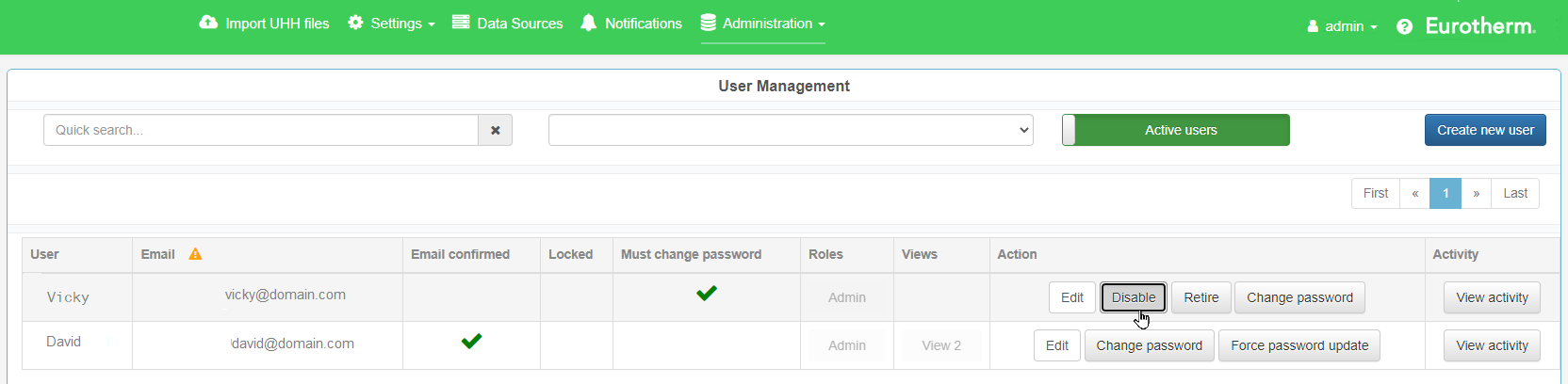
- Go to Administration > User Management.
- If required, click on the Active users / Inactive users slider (at the top of the page) to show the respective users.

- Locate the user account to be disabled.
- In Quick Search..., filter the list by username and email address.
- Specify to list only users in a specific Role.
- On the user account, click on Disable.
A confirmation window opens. - Click on OK.

 Filter the user list, if required...
The user account is removed from the active user list and moves to the inactive user list.