EPM Hints and Tips
The following hints and tips are designed to help you get the most out of your EPM Solution:
Select from the following options to expand the details:
 Cross screen functionality
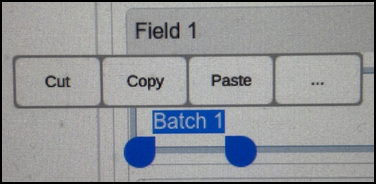
When in Configuration mode, from any field that is completed with free text, you can Cut, Copy and Paste the text:
-
From the EPM Device - Touch and hold on the text required. The text highlights in blue with indicators underneath and an options menu above. Drag the indicators to change the highlighted text if appropriate and then select the action required.
-
From a computer screen - Single click or click, hold and drag to highlight the text required. Right click on the highlight and select Cut or Copy as required.
You can now move to the screen and/or field required, and:
-
From the EPM Device - Touch and hold on the destination for your text and select Paste.
-
From a computer screen - Right click on the destination for your text and select Paste:
Using the Onscreen Keyboard
Whenever EPM expects you to enter any details, the onscreen keyboard displays:
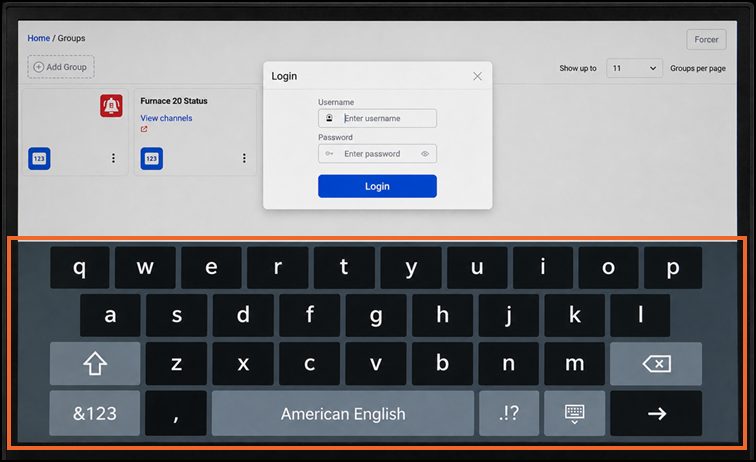
Type in the usual way to enter any information required.
If you need to move the cursor, touch the screen where you want to move it to, including, if required in the middle of a word or phrase to correct any mistakes or add missing information.
If you have a mouse connected to your device, you can either:
-
Left click to select where on the screen to enter data, or
-
If you select and hold the space bar until the keyboard characters disappear and then reappear, moving the mouse automatically moves the location of your cursor.
Internationalization of the Device Onscreen Keyboard
To access language specific letters, for example, é, â, ä and ß:
-
Select the language required for your device from select Options
 - Settings and Users - Settings - Internationalization.See Configuring Internationalization for details.
 -
When the onscreen keyboard displays, select and hold the relevant character to display additional options for selection.