Using this Help Center
The following hints and tips can help you get the most out of the EPM Solution Help Center:
-
Checking that you are looking at the most recent version - If you have cookies enabled on your device, it automatically shows you a cached (saved) version of the website you are viewing. This is great as it speeds up your experience, but it may not show you the latest information. Select Refresh
 on your browser to see the latest version of the page.
 -
Returning to the main Help Center screen - Select the Eurotherm by Watlow logo in the top left corner to return to the main Help Center screen.
-
Using the Search option - If you are looking for a specific topic, instead of guessing where it may be in the hierarchy of the Help Center, enter a word or two in Search
 <Enter>on your keyboard. and press return.
 -
Changing the language - If supported, this help center displays in the same language as your browser. To change the language, select Change language
 and choose from the languages available.See Machine Translation Disclaimer for details.
 -
Printing topics - Any topic can be printed by selecting Print
 from the top right of the topic screen.
 -
Expanding options - Some topics contain lists where the options are collapsed. These enable you to expand the section you require on an adhoc basis. Select Expand
 next to the option to display the detail: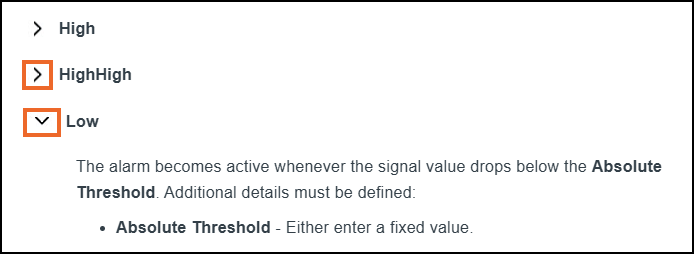
Or, select Expand all
 to display all options.
 -
Collapsing options - To collapse expanded options, select Collapse
 and the detail is hidden.
All devices and packaging have a QR code that links to this Help Center:
-
EPM devices and packaging, have a QR code which links to the main Help Center landing topic, https://support.watlow.com/epm/Default.htm.
-
EPM modules, have a QR code which links to the relevant Quick Links topic:
-
https://support.watlow.com/epm/en-us/Content/H-General/AI3_Landing.htm
-
https://support.watlow.com/epm/en-us/Content/H-General/AI2_Landing.htm
-
https://support.watlow.com/epm/en-us/Content/H-General/DI4_Landing.htm
-
https://support.watlow.com/epm/en-us/Content/H-General/RL2_Landing.htm
-
https://support.watlow.com/epm/en-us/Content/H-General/BMS_Landing.htm
Note - The QR code on the modules link to the English (American) version of the Help Center. To change the language, select Change language and choose from the languages available.
-
Please be aware of the following:
-
This help center uses screen shots from the EPM-15 device for demonstration purposes, see The Differences between EPM-07 and EPM-15 for details if you are using an EPM-07.
Machine Translation Disclaimer
This content has been translated from English (US) using machine translation technology. While we strive for accuracy, automated translations may contain errors or inaccuracies. The English version is the authoritative text.
For any clarifications, please refer to the original content:
-
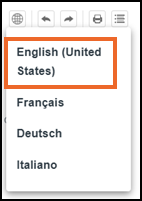
From any topic, select Change language
. -
Select English (United States):
Last update - August 2026