Configuring Internationalization
Internationalization is where you configure your time zone, language of choice, and date and time format. To configure Internationalization:
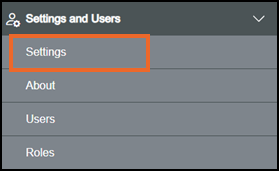
From the EPM User Interface screen, select Options  - Settings and Users - Settings:
The Settings screen displays, select Internationalization which then displays on the right-hand side of the screen:
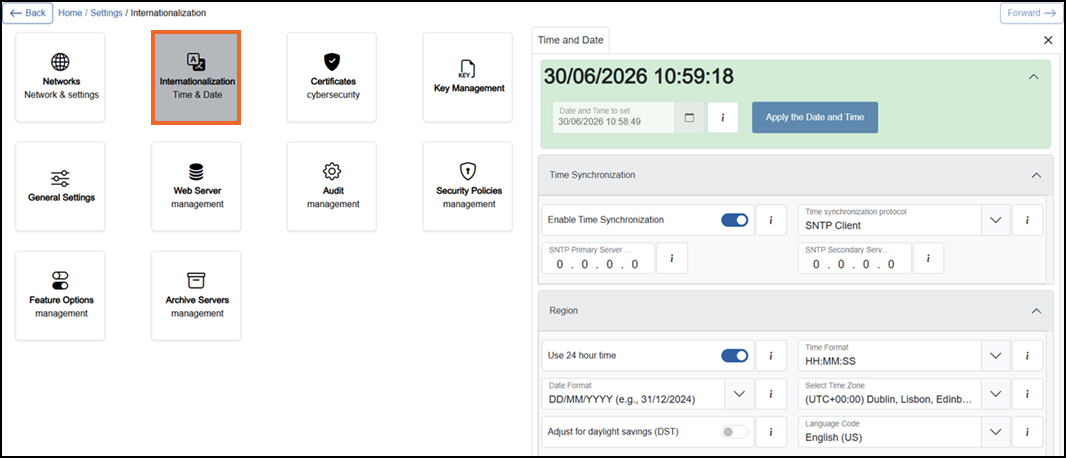
Select from the following options to expand the details:
 Time and Date
To set Time and Date:
-
From the left-hand side of the Internationalization screen, select Expand
 if not expanded automatically: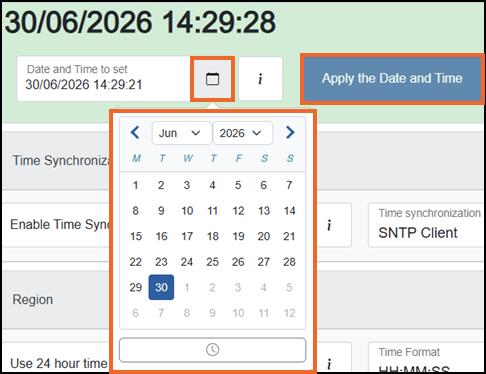
-
Select Calendar
 and then using the month, year and day options, set the correct date.
 -
Select Clock
 at the bottom of the Calendar panel and select time from the hour, minute and seconds options available:
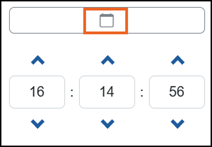 Tip - A single select moves the numbers one at a time, a long hold moves through the numbers quickly.Tip - To go back to the calendar again, select Calendar
 at the top.
 -
Select Apply the Date and Time
 , once the date and time is set correctly.Tip - You can set both Date and Time together before you select Apply the Date and Time.
Time Synchronization
To enable Time Synchronization:
-
From the left-hand side of the Internationalization screen, select Expand
 if not expanded already and complete as required: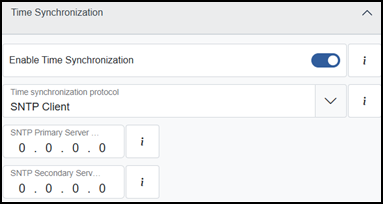
-
If you are not already in Configuration lock, the Configuration lock screen displays
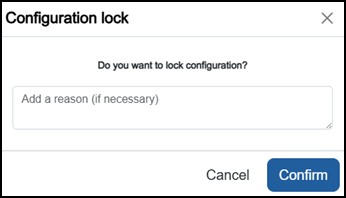
Enter a reason if required and then select Confirm
 . The system configuration is now locked pending the submission of your update and the Configuration Locked
  icon displays on the status bar.Note - Configuration lock does not affect the operation of the EPM device.See Configuration Lock for details.
 - Select Enable Time Synchronization which is Off by default. When On it automatically synchronize EPM Data date and time by enabling a Time synchronization protocol This protocol is essential for ensuring that clocks across different systems or devices are aligned to a common time reference..
-
Select SNTP Primary Server which is configured by default as the main source for time and date synchronization.
-
Select SNTP Secondary Server if the Primary Server fails, which then acts as a backup.
-
Select Time synchronization protocol which is set to SNTP Client
Simple Network Time Protocol Client (SNTP Client) - It is a device or software component that uses the Simple Network Time Protocol (SNTP) to request and receive accurate time information from an SNTP server..
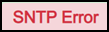 displays when time synchronization is enabled and the configured SNTP server cannot be reached. If a secondary SNTP server is configured, the device tries the secondary server when the primary server is unreachable or fails. If this message displays, check the SNTP server and ensure the device is connected to the network.
 icon and use the month, year, and day options to set the correct date manually.Region
To set Region:
-
From the left-hand side of the Internationalization screen, select Expand
 if not expanded automatically and complete as required: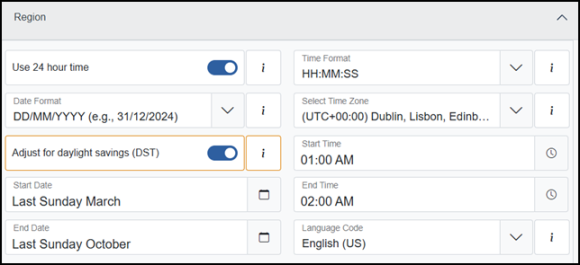
-
If you are not already in Configuration lock, the Configuration lock screen displays
Enter a reason if required and then select Confirm
. The system configuration is now locked pending the submission of your update and the Configuration Locked icon displays on the status bar.Note - Configuration lock does not affect the operation of the EPM device.See Configuration Lock for details. -
Change Use 24 Hour Time to On
 to change from a 12 hour format to a 24 hour format.
 -
Select Time Format from the available list. Defaults to HH:MM:SS.
-
Select Date Format from the available list. Defaults to DD/MM/YYY.
-
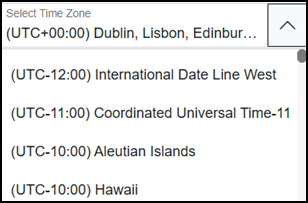
Select Select Time Zone from the available list. Defaults to (UTC+00:00) Dublin, Lisbon, Edinburgh, London:
-
Select Adjust for daylight savings (DST) to set daylight savings. Off
 by default:
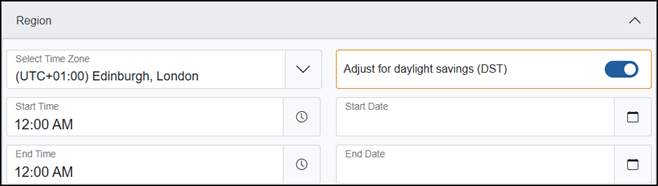 Note - DST option is disabled when the selected time zone does not support DST.
 -
Select Calendar
 to set the Start Date and then select Ok.
 -
Select the Calendar
 to set the End Date and then select Ok.
 -
Select the Clock
to set the Start Time and then select Apply. -
Select the Clock
to set the End Time and then select Apply. -
Select your Language Code from the available list. Defaults to English (US).
 displays briefly at the top right corner of your screen when you make any changes. To clear the message if required, select Close
  .
.Once complete, select Review pending changes  screen to review updates to the configuration, and submit them. See Reviewing and Submitting Changes for details if required.
Last update - August 2026