Extracting the UHZ Files from the 6000 Series
The configuration files for your 6000 series device(s) are stored as .uhz files. To migrate to the EPM Solution, you need to extract a .uhz file for each of your series 6000 devices, run a conversion on it and then import it into the EPM User Interface(s).
Select from the following options to expand the details:
 Extracting a uhz Configuration File from a 6000 Series Device
To extract a uhz configuration file from a 6000 series device
-
Log in to your 6000 device as a user with permission to copy the Configuration files, for example, an Engineer.
-
Select Root Manager
 - Operator
  - Options.
 -
Insert a flash drive, it into your device.
Tip - The 6000 series of recorders only supports USB flash drives up to 8Gb in size, do not attempt to save your configuration file to a flash drive with a larger capacity, as the file will not save. -
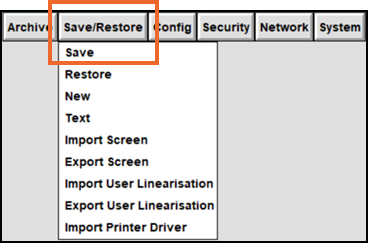
Now select Save/Restore - Save:
-
Select File name and a list of available files displays.
-
Select Close folder
 to move to the previous directory level.
 -
Select usbfront\.
-
Select Open folder
 to select this level of the directory.
 -
In File name, enter a name for this file.
Tip - If you are migrating multiple devices, ensure you use a file name that identifies this device accurately. -
Select Save and the progress bar displays in the top right-hand corner until the transfer is complete.
Extracting a 6000 Series uhz Configuration File from Bridge
To extract a 6000 series uhz configuration file from Bridge
-
Log in to Bridge as a user with permission to copy the Configuration files, for example, an Engineer.
-
Select Save/Restore
 - Save: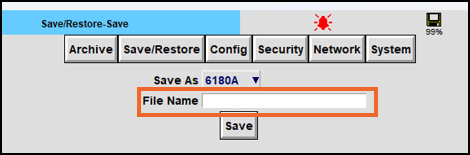
-
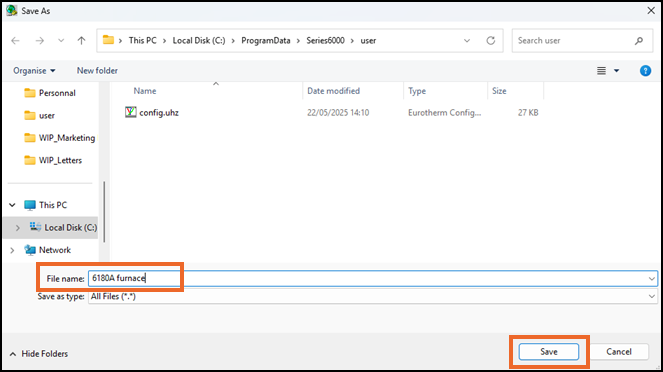
Select File Name and the Save As screen displays:
-
In File name, enter an appropriate name and select Save.
Your configuration .uhz file is now saved to your chosen location. and can be emailed to the address supplied by your Eurotherm sales representative.