Configuring Feature Options
Feature Options gives you control over several key device features. Each toggle bar lets you turn a feature on or off as needed.
To configure features:
-
From the EPM User Interface screen, select Options
 - Settings and Users - Settings: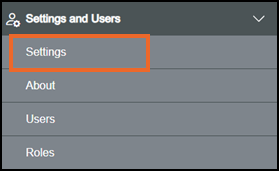
-
The Settings screen displays, select Feature Options which then displays on the right-hand side of the screen:
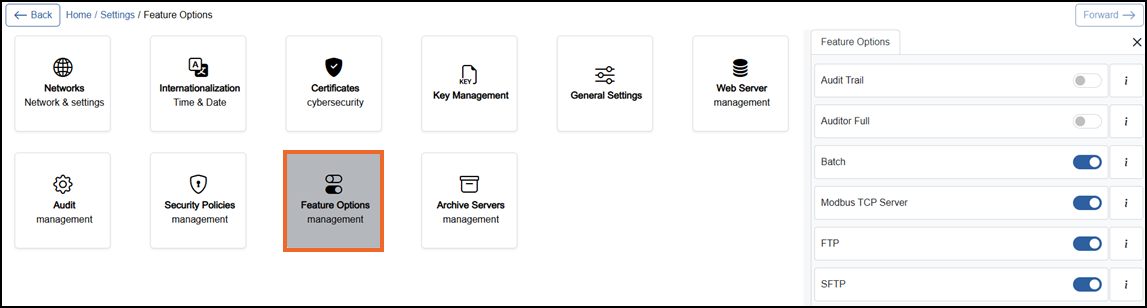
-
If you are not already in Configuration lock, the Configuration lock screen displays
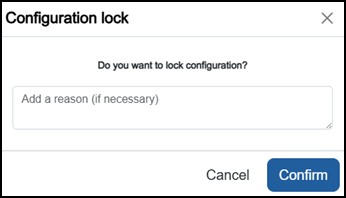
Enter a reason if required and then select Confirm
 . The system configuration is now locked pending the submission of your update and the Configuration Locked
  icon displays on the status bar.Note - Configuration lock does not affect the operation of the EPM device.See Configuration Lock for details.
 -
Complete as required:
- Audit Trail - Off
 by default. Change to On
  to record user actions such as changing device settings, managing users and permissions, acknowledging alarms and logging in or out in the audit log. Records include the time, user, source, and action. See Configuring Audit for further details.
 -
Auditor Full - Off
by default. Change to On to add electronic signing, authorization, and notes to the Audit Trail. These requirements are applied to user actions according to the permissions assigned to each action. This functionality supports compliance with FDA 21CFRPart11 Food and Drug Administration Title 21 of the Code of Federal Regulations, Part 11 (FDA 21CFRPart11) - It is a US FDA regulation that defines the rules under which electronic records and electronic signatures are considered trustworthy, reliable, and equivalent to paper records and handwritten signatures in FDA-regulated environments (e.g. pharma, biotech, medical devices, food).. See Configuring Audit for further details.Note - Auditor Full requires another active user in the submitted configuration with Signing, Authorization or Note permissions. Grant one of these permissions to another active user, or disable Auditor Full before submitting the configuration.
 -
Modbus TCP Server - On
by default. Enables the Modbus transmission control protocol (TCP) server functionality, allowing external Modbus clients to read or write exposed data. Change to Off to disable the Modbus TCP server functionality. See Configuring a Modbus Server for further details. -
FTP
File Transfer Protocol (FTP) - A protocol for transferring files between a client and a server over a network. - Off by default. Change to On to enable file transfer protocol (FTP) functionality and FTP-based archiving.Note - FTP does not encrypt login credentials or transferred data, making it vulnerable to interception and other attacks. We recommend you use SFTP where supported. -
SFTP
Secure File Transfer Protocol (SFTP) - A file transfer protocol built on SSH (Secure Shell). - Off by default. Enables secure file transfer protocol (SFTP) and SFTP-based archiving. Change to On to enable SFTP functionality. Preferred over FTP for security and token-pricing reasons.
- Audit Trail - Off
-
Once complete, select Review pending changes
 screen to review updates to the configuration, and submit them. See Reviewing and Submitting Changes for details if required.Note - Reviewing and submitting can be completed in bulk once you have completed all your additions and/or updates.
 Last update - September 2026