Configuring Security Policies
The Security management serves as the central hub for managing and configuring all aspects of system security. It is designed to provide administrators with granular control over authentication, authorization, data integrity and regulatory compliance.
To manage your device security:
-
From the EPM User Interface screen, select Options
 - Settings and Users - Settings: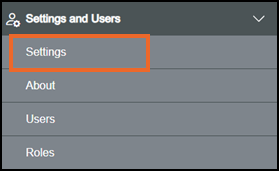
-
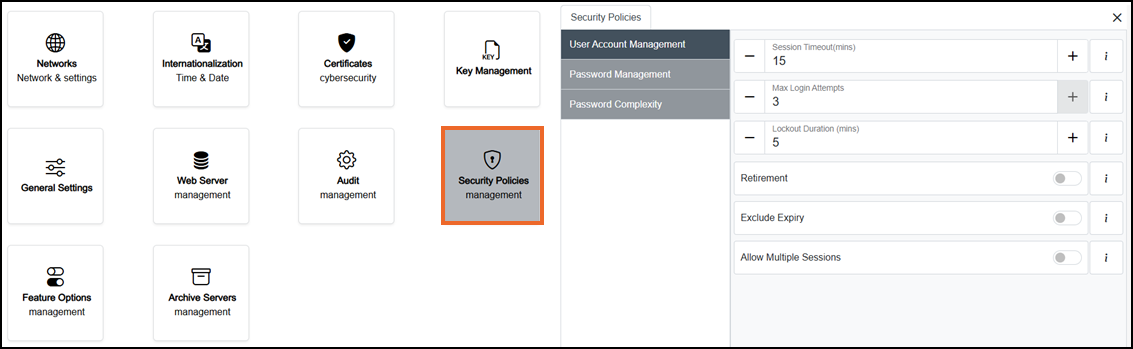
The Settings screen displays, select Security Policies which then displays on the right-hand side of the screen:
-
Select from the following options to expand the details:
 User Account Management
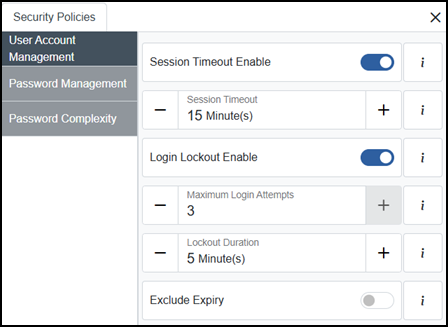
User Account Management involves creating, maintaining, securing and removing user accounts within an organization’s systems. To manage user accounts, complete as required:
-
Session Timeout Enable - On
 by default. When On, the system automatically signs out the user after the configured period of inactivity. When Off
  inactivity does not sign out the user.
 -
If you are not already in Configuration lock, the Configuration lock screen displays
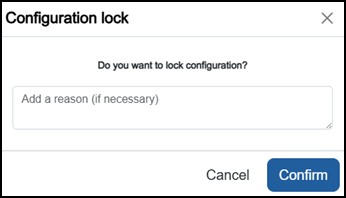
Enter a reason if required and then select Confirm
 . The system configuration is now locked pending the submission of your update and the Configuration Locked
  icon displays on the status bar.Note - Configuration lock does not affect the operation of the EPM device.See Configuration Lock for details.
 -
Login Lockout Enable - On
by default. When On, the user account is locked after the configured number of unsuccessful login attempts. Further login attempts are rejected until the lockout duration expires. When Off unsuccessful login attempts do not lock the account.-
Max Login Attempts - Defaults to 3. Use the Plus
 or Minus
  to edit the number of unsuccessful logins before a user is locked out of the system.
-
-
Lockout Duration - Defaults to 5 minute(s). Use the Plus
or Minus to edit the number of minutes to apply a lock out for, after the Max Login Attempts is exceeded.
-
Exclude Expiry - Off
by default. When On an administrator can prevent an user account password from expiring automatically.
-
-
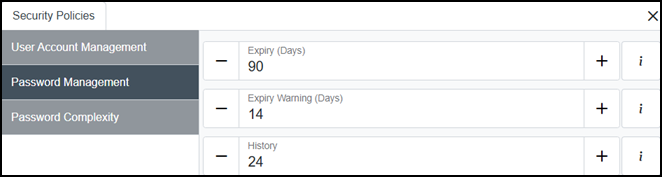
Expiry (Days) - Defaults to 90. Sets how often users must reset their passwords. Use the Plus
or Minus to edit the days required. -
If you are not already in Configuration lock, the Configuration lock screen displays
Enter a reason if required and then select Confirm
. The system configuration is now locked pending the submission of your update and the Configuration Locked icon displays on the status bar.Note - Configuration lock does not affect the operation of the EPM device.See Configuration Lock for details. -
Expiry Warning (Days) - Defaults to 14. Sets how many days before expiry the user is warned. Use the Plus
or Minus to edit the days required. -
History - Defaults to 24. Sets how many previous passwords are retained and checked. Users cannot reuse any of those passwords when creating a new one. Use the Plus
or Minus to edit the number of previous passwords that cannot be used again. -
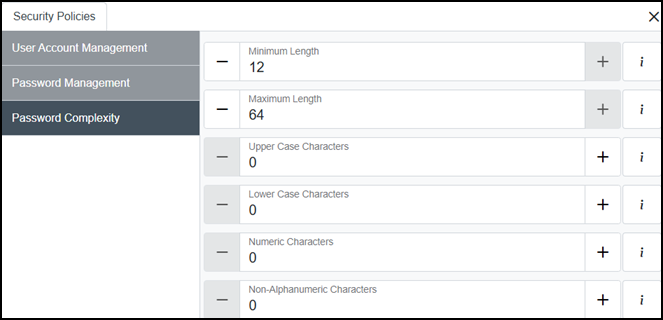
Minimum Length - Defaults to 12. Defines the minimum number of characters allowed in a password. Use the Plus
or Minus to edit the minimum length. -
If you are not already in Configuration lock, the Configuration lock screen displays
Enter a reason if required and then select Confirm
. The system configuration is now locked pending the submission of your update and the Configuration Locked icon displays on the status bar.Note - Configuration lock does not affect the operation of the EPM device.See Configuration Lock for details. -
Maximum Length - Defaults to 64. Defines the maximum number of characters allowed in a password. Use the Plus
or Minus to edit the maximum length. -
Upper Case Characters - Defaults to 0. Defines the minimum number of uppercase characters required in a password. Use the Plus
or Minus to edit the number required. -
Lower Case Characters - Defaults to 0. Defines the minimum number of lowercase characters required in a password. Use the Plus
or Minus to edit the number required. -
Numeric Characters - Defaults to 0. Defines the minimum number of numeric characters required in a password. Use the Plus
or Minus to edit the number required. -
Non-Alphanumeric Characters - Defaults to 0. Defines the minimum number of non-alphanumeric characters required in a password. Use the Plus
or Minus to edit the number required. -
Once complete, select Review pending changes
 screen to review updates to the configuration, and submit them. See Reviewing and Submitting Changes for details if required.Note - Reviewing and submitting can be completed in bulk once you have completed all your additions and/or updates.
Password Management
Password Management involves creating, storing, retrieving and updating passwords used to authenticate users. To manage passwords, complete as required:
Password Complexity
Password Complexity refers to the strength of a password based on its structure and how difficult it is to guess or crack. To manage password complexity, complete as required:
Last update - August 2026