Managing Users from the EPM User Interface
User management from the EPM User Interface is designed to enable you to manage a small number of users and roles across individual devices.
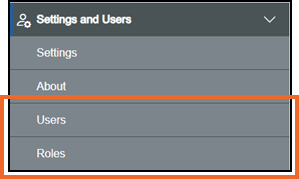
From the Settings and Users screen, you can:
-
Manage your individual users, see EPM User Interface Users for details.
-
Manage roles within your system - To access EPM Solution features, a user must have Permissions. These are allocated to Roles which are then allocated to specific users, see EPM User Interface Roles for details.
To manage users and roles:
-
From the EPM User Interface, select Options
 - Settings and Users and then select either Users or Roles as required:
Last update - April 2026