EPM User Interface Roles
To access EPM Solution features, a user must have user permissions. These are allocated to Roles which are then allocated to specific users.
The Settings and Users - Roles screen is designed to enable you to manage user permissions for a small number of users, across individual devices and comes with five default Roles:
-
Administrator - Default permissions, cannot be updated.
-
Engineer - Default permissions, cannot be updated.
-
Logged Out - The access level permitted without a user being logged in, see Configuring Logged Out Screens from the EPM User Interface for details.
-
Operator - Default permissions, cannot be updated.
-
Quality - Default permissions, cannot be updated.
From the Roles screen, you can:
-
Display a list of all your roles, see Accessing the EPM User Interface Roles Screen for details.
-
Add new roles, see Configuring Roles from the EPM User Interface for details.
-
Edit the user permissions allocated to a role, see Viewing or Editing Roles from the EPM User Interface for details.
Note - The only default Role that can be updated is Logged Out.
Accessing the EPM User Interface Roles Screen
To access the Roles screen, from the EPM User Interface screen, select Options  - Settings and Users - Roles:
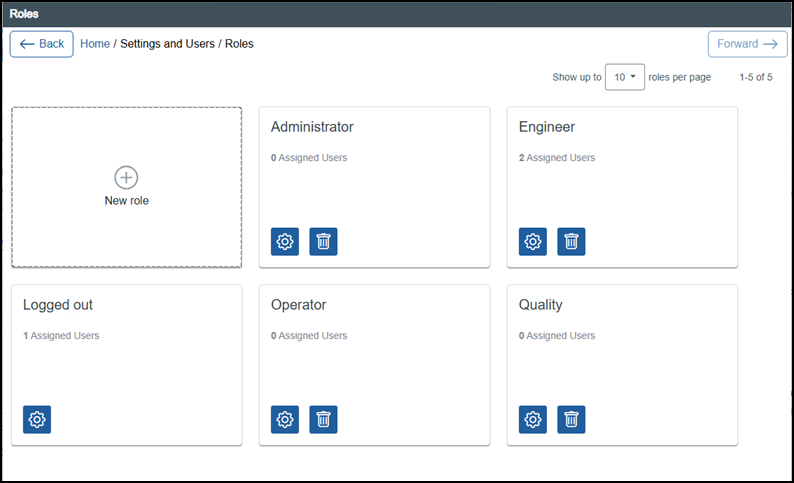
The Roles screen displays the following:
-
New role
 - Select to add a new role to your device, see Configuring Roles from the EPM User Interface for details.
 -
Existing roles - These display in card form, showing the number of users assigned:
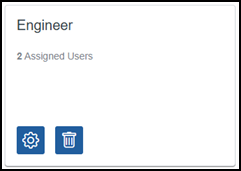
From a role card, you can:
-
Display and update details
 - Select to display the Edit Role pane to the right-hand side of your screen and update if required, see Viewing or Editing Roles from the EPM User Interface for details.
 -
Delete a Role
 - Select to delete a role, see Deleting Roles from the EPM User Interface for details.
-
Last update - September 2026