Driving the Watchdog/User Relay
The EPM-07 and the EPM-15 devices both have an Output Relay, single pole double throw (SPDT), socket and push in plug on their base:
| EPM-07
|
EPM-15
|
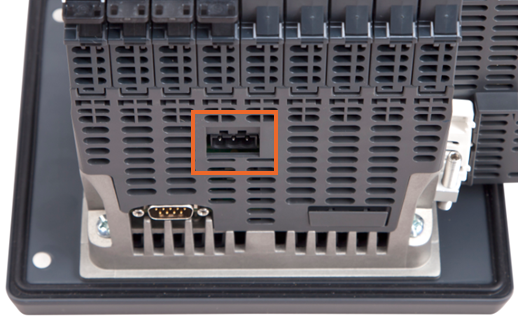
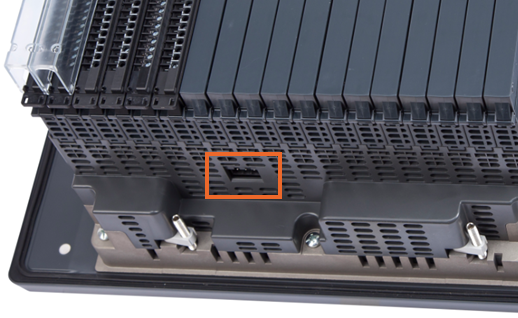
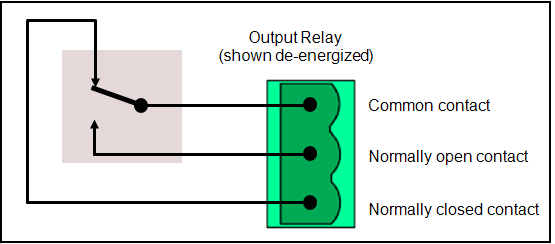
The integral Watchdog/User relay always opens on Watchdog failure of the device and can be driven by your application. For example, it is possible to drive alarm beacons independent of any I/O modules installed:
| Watchdog Relay | |||
|---|---|---|---|
| Electrical durability |
|
||
| Minimum switching current |
|
||
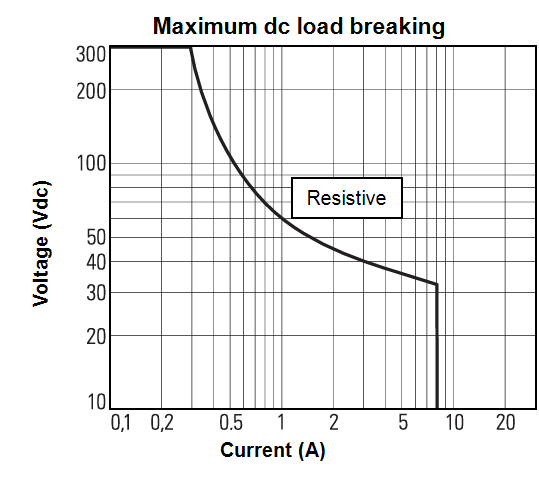
| Switched voltage range |
|
||
| Switched current range |
|
||
| Snubber |
|
||
| Isolation |
|
|
|
|
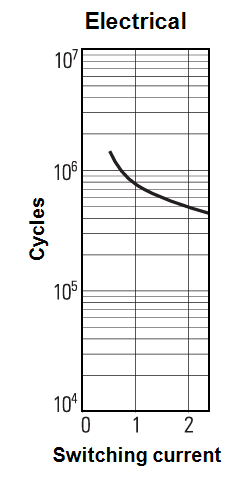
To configure the Watchdog/User relay:
-
Connect your alarm beacon to the Watchdog/User relay socket on the base of your EPM device.
Note - The EPM device output is a volt free contact. -
From the channel required, configure an appropriate Alarm, see Configuring an Alarm for details.
-
Once the alarm is configured, select Add Job. and configure the Job to trigger the relay.
-
From the Job, select Add action
 .
. -
Complete the Action details:
-
Descriptor - Defaults to 'Action n' where 'n' is the next number in sequence from the previous Action. Enter a unique name for this Action to identify it if required (maximum characters 40).
-
Category- From the available list, select Watchdog Relay.
-
Invert - Defaults to Off
 , select the toggle to change this to an Absent trigger
  , for example:
-
With Invert Off
, the Watchdog Relay is active whenever the alarm is active. -
With Invert On
, the Watchdog Relay is active whenever the alarm or Job is not active.
-
-
Last update March 2026