Logging in
EPM Data Management is a role based system. Roles are configured with permissions to allow access to specific functionality. To access the functionality permitted for your role, you must first log in.
To log into EPM Data Management:
-
From:
-
An EPM device, select Login
 to display the Login screen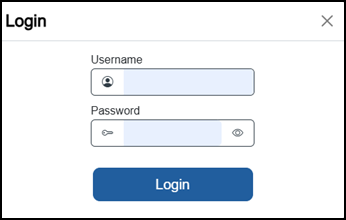
-
A remote browser that has access to the network your EPM device is attached to, enter the IP Address of the device required, to display the Login screen
Tip - Your IP Address displays in Settings and Users - Settings - Networks.-
With Logged out user disabled:
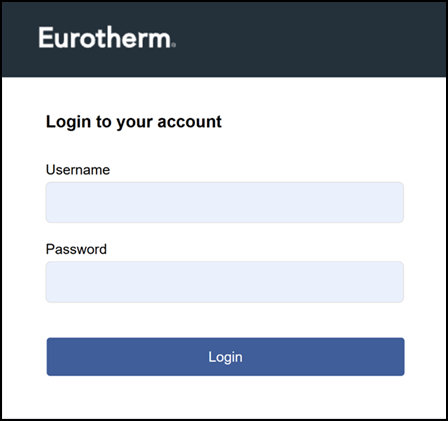
-
With Logged out user enabled:
-
-
-
Complete as follows:
Tip - If this is the first time you have logged in, your Username and temporary Password are provided by your administrator.-
Username - Enter your username.
-
Password - Enter your password.
-
-
If this is:
-
The first time you have logged in and your organization requires it, or
-
Your administrator has requested a password change, the Change Password screen displays:
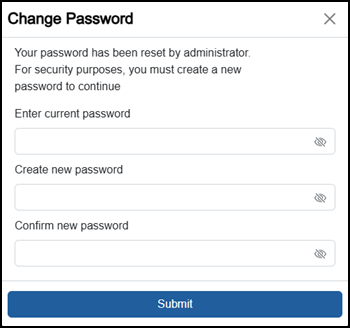
Complete as follows:
-
Enter current password - Enter the password you have been provided with.
-
Create new password - Enter the password you want to use, this must comply with the criteria set up by your organization.
Tip - On screen tips display in red if your new password does not meet the required format. -
Confirm new password - Enter your new password again toconfirm.
-
-
Select Login
 to log in or Submit
  to reset your password and log in.
You are now logged in and your username, in this example 'eurotherm', displays in the top right-hand corner  .
.
Last update - July 2026