Maths
A Maths channel performs mathematical operations on a set of input values. Input values can come from hardwired inputs, comms inputs, the outputs of another channels, or be manually entered. Each Maths channel uses a specific maths type such as Add, Average or Polynomial that defines how the channel processes its inputs.
Within EPM Data Management up to 128 math channels can be configured.
The following math types are available:
-
10 to the Power, see Configuring a '10 to the Power' Maths Channel for details.
-
Absolute Value, see Configuring an Absolute Value Maths Channel for details.
-
Add, see Configuring an Add Maths Channel for details.
-
Analog Value, see Configuring an Analog Value Maths Channel for details.
-
Channel Average, see Configuring a Channel Average Maths Channel for details.
-
Channel Latched Maximum, see Configuring a Channel Latched Maximum Maths Channel for details.
-
Channel Latched Minimum, see Configuring a Channel Latched Minimum Maths Channel for details.
-
Constant, see Configuring a Constant Maths Channel for details.
-
User Digital Value Latched, see Configuring a Digital Value (Latched) Maths Channel for details.
-
Divide, see Configuring a Divide Maths Channel for details.
-
e to the Power, see Configuring an 'e to the Power' Maths Channel for details.
-
Group Average, see Configuring a Group Average Maths Channel for details.
-
Group Latched Maximum, see Configuring a Group Latched Maximum Maths Channel for details.
-
Group Latched Minimum, see Configuring a Group Latched Minimum Maths Channel for details.
-
Group Maximum, see Configuring a Group Maximum Maths Channelfor details.
-
Group Minimum, see Configuring a Group Minimum Maths Channel for details.
-
Log Base 10, see Configuring a 'Log Base 10' Maths Channel for details.
-
Log Base e, see Configuring a 'Log Base e' Maths Channel for details.
-
Maximum, see Configuring a Maximum Maths Channel for details.
-
Minimum, see Configuring a Minimum Maths Channel for details.
-
Multiply, see Configuring a Multiply Maths Channel for details.
-
Polynomial, see Configuring a Polynomial Maths Channel for details.
-
Rate of Change, see Configuring a Rate of Change Maths Channel for details.
-
Rolling Average, see Configuring a Rolling Average Maths Channel for details.
-
Sample and Hold, see Configuring a Sample and Hold Maths Channel for details.
-
Square Root, see Configuring a Square Root Maths Channel for details.
-
Subtract, see Configuring a Subtract Maths Channel for details.
-
Switch, see Configuring a Switch Maths Channel for details.
-
Test Signal Generator, see Configuring a Test Signal Generator Maths Channel for details.
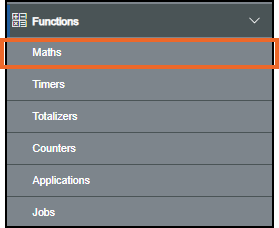
To access the Maths screen, from the EPM User Interface, select Options  - Functions - Maths:
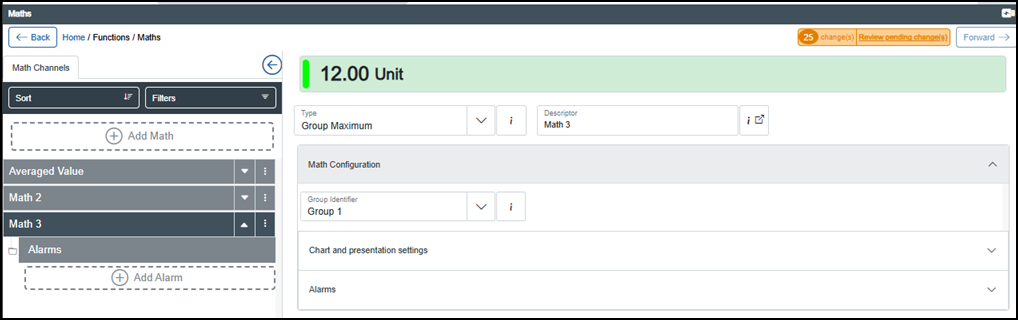
The Maths screen displays providing the following options:
Last update - April 2026