Exporting a Modbus Address Map
The EPM Modbus Server automatically generates a Modbus address map for the comms link each time the application is submitted. When a Modbus Server comms link is first added, no address map exists. After the first submit, an address map is created automatically. This map includes all channel values, channel value status, Channel Alarm Active and Unacknowledged status, Batch State, Batch Fields, and basic Batch control commands for the application.
Timer channels are not included. All other channel types are included: Hardwired I/O, Maths, Totalizers, Counters, and Applications.
On subsequent submits, the Modbus address map is not recreated from scratch. Instead, it is updated to minimize changes and help preserve any existing remote client configuration.
When changes are submitted:
-
If the change does not affect channels or batch data (for example, enabling the Web Server), the Modbus address map is not changed.
-
When a channel or batch is deleted, the association between the Modbus address(es) and the channel or batch data is cleared. The address(es) remain in the EPM Modbus Server unless the gap created is too large when they are removed. A remote client can read the address with a zero value, but cannot write to it.
-
When a channel or batch is added, additional addresses are allocated at the end of the address map for the new channel or batch data.
-
When a channel or batch type is changed, or when the Modbus Server Default Numeric Format or Default String Format parameters are changed, each address in the Modbus address map is checked to determine whether the associated data type or register count has changed. For each changed parameter, it is treated as if it had been deleted and added again, and is moved to the end of the register map.
Extensive channel or batch deletions, or changes to the default data formats in the Modbus Server settings, can lead to fragmentation of the address map.
Fragmentation can only be removed by deleting the address map and submitting the change to generate a new map. The remote client configuration must then be updated to match the new address map. See Deleting a Modbus Address Map for details.
To export an address map:
-
Insert Universal Serial Bus Type-C (USB-C) flash drive if you are exporting from an EPM Data Management device.
Note - When exporting from a web browser, the file is saved in your PC’s Downloads folder. See Export File name for details. -
From EPM User Interface screen, select Options
 - Device I/O - Comms Link: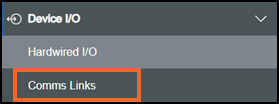
-
The Comms Link screen displays:
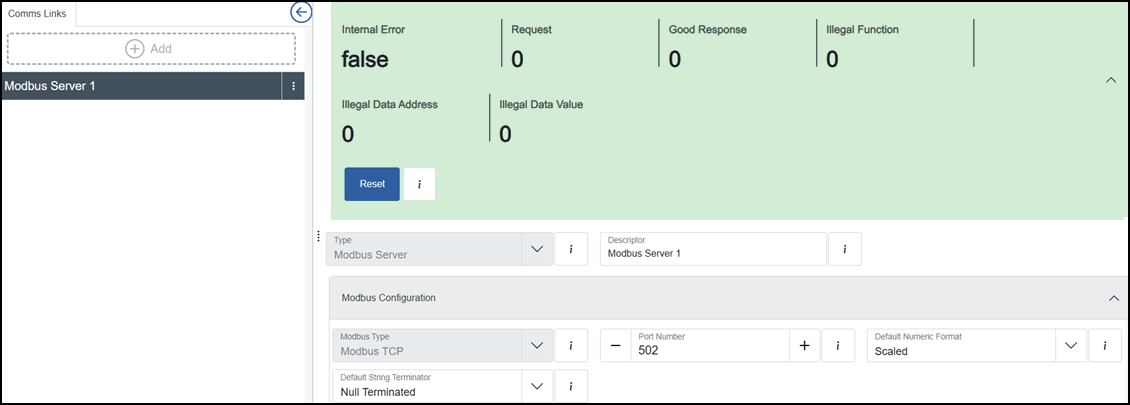
From the left-hand pane, select Options
 - Export Address Map: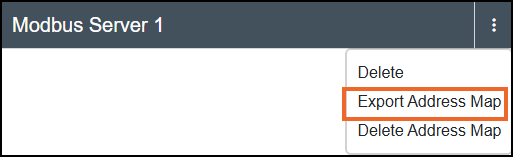
-
The Address map downloaded
 message displays briefly at the top right corner of the screen.
 message displays at the top right corner of the screen.
 Export File name
When you export a Modbus address map, EPM Data Management creates a delimited text file (for example, comma-separated values) with a structured file name. The file name helps you identify the communication link associated with the export.
The file name format is <IP address>_<Modbus comms link descriptor>_Address_Map.csv, where:
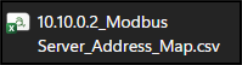
-
<IP address> is the IP address associated with the Modbus communication link.
-
'_' underscores are fixed parts of the file name.
-
<Modbus communication-link descriptor> is the Descriptor entered for the communication link.
-
_Address_Map.csv is fixed text.