Configuring a Modbus Server
Modbus Server is a function in EPM Data Management that exposes device data to external Modbus Transmission Control Protocol (TCP) clients through an automatically generated register map, so other systems can read and write supported values.
From EPM User Interface screen, select Options  - Device I/O - Comms Link:
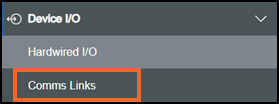
Select from the following options to expand the details:
 Adding a Comms Link
-
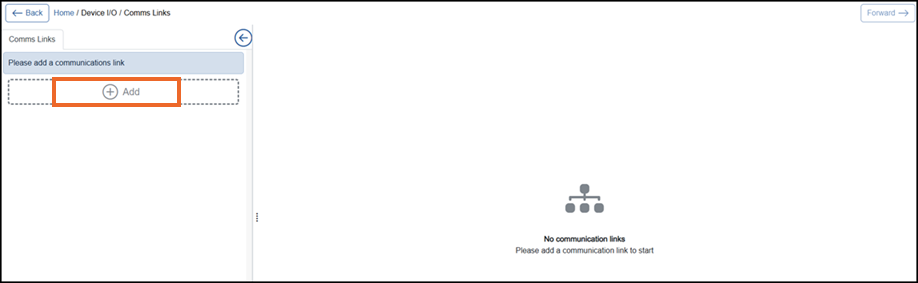
From the left-hand side of the Comms Link screen, select Add
 :
:
-
If you are not already in Configuration lock, the Configuration lock screen displays
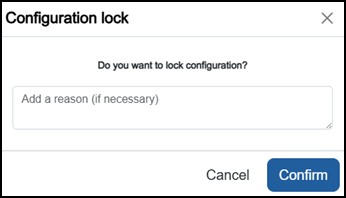
Enter a reason if required and then select Confirm
 . The system configuration is now locked pending the submission of your update and the Configuration Locked
  icon displays on the status bar.Note - Configuration lock does not affect the operation of the EPM device.See Configuration Lock for details.
Configuring a Comms Link
-
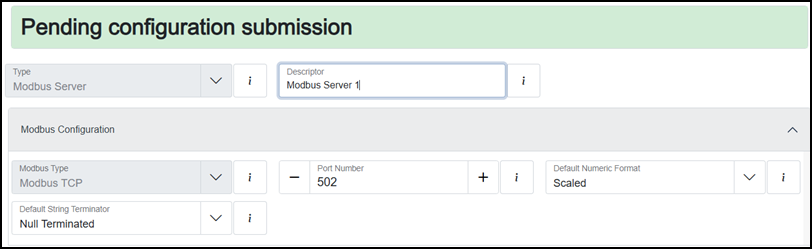
From the left-hand side select Modbus Server which then displays on the right-hand side of the screen:
-
Complete the configuration as required:
-
Type - Defaults to 'Modbus Server'. This option cannot be updated.
-
Descriptor - Defaults to 'Modbus Server n'. Enter a unique name for this communication link to identify it if required.
-
Modbus Type - Defaults to 'Modbus TCP'. This option cannot be updated.
-
Port Number - Displays the TCP port used for Modbus communication. Defaults to '502' the standard port for Modbus TCP. Enter a valid port number or use the Plus
 or Minus
  to allocate the correct port. (Lowest 1 highest 65535).
 -
Default Numeric Format - Defines how numeric values are exchanged over Modbus:
-
Scaled - Values are transmitted using one register as a scaled 16 bit integer .
-
Float32 - Values are transmitted using two registers as Institute of Electrical and Electronics Engineers (IEEE) 754 32-bit floating point numbers in engineering units.
-
-
Default String Terminator - Defines how text strings end when sent over Modbus:
-
Null Terminated - String ends with American Standard Code for Information Interchange (ASCII) null 0x00 byte.
-
Space Packed - String is padded with ASCII space characters 0x20 until the full register length is filled.
-
-
Once complete, select Review pending changes  screen to review updates to the configuration, and submit them. See Reviewing and Submitting Changes for details if required.