Using Comms Link Operator Panel
To view and utilize a Comms Link operator panel:
-
From EPM User Interface screen, select Options
 - Device I/O - Comms Link: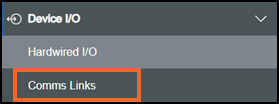
-
The Comms Links screen displays:
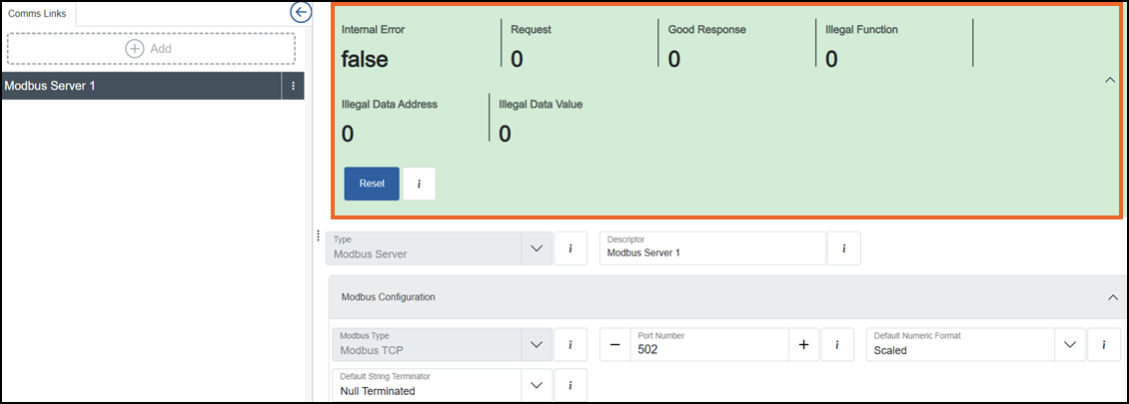 Note - Diagnostic counters are not retained when power to the EPM device is lost. After the device powers up, all counters restart at zero.
 -
The Operator panel displays the following for the selected communication link:
-
Internal Error - Indicates that the EPM Modbus server has detected an internal problem. This is used for non-communication issues within the server and should be False during normal operation. When True, an alarm is raised and you should contact your supplier.
-
Request - Number of requests received by the EPM Modbus server from all connected Modbus clients. This counter increments once for each request received. If it is not incrementing, there may be no Modbus clients connected, the Modbus client configuration may not match that of the EPM Modbus server, or there may be an installation issue with no communication path from client to server, for example, a disconnected cable.
-
Good Response - Number of requests received by the EPM Modbus server that were valid and generated a successful response (not an exception) to the Modbus client. Under normal operation, this increments along with the Request count. If the Request count and Good Response count do not increment together, the following counters may help indicate the problem area. Note that a difference in the count may not always indicate a current issue, the difference may be historic and the cause may already have been resolved.
-
Illegal Function - Number of requests where the Modbus client used a Modbus function code that the EPM Modbus server does not support. This causes the EPM Modbus server to respond with 0x01 exception code. See Modbus Server supported function codes for details.
-
Illegal Data Address - Counts requests where the client asked for an address, or address range, that the server does not support on the used function code. This causes the EPM Modbus server to respond with 0x02 exception code. Check the client configuration and update it to only use function code address combinations in the exported EPM address map. For example, if an EPM Modbus Server uses holding registers 1000 to 1010 and a client tries to read register 2000, this count and exception are generated because register 2000 does not exist. The same happens if a client requests three registers starting at 1009, because register 1011 is outside the valid range.
-
Illegal Data Value - Number of requests where the Modbus client sent data that is not supported by the EPM Modbus server. For example, when a client requests to read more items than the maximum quantity supported by the EPM Modbus server. This causes the EPM Modbus server to respond with 0x03 exception code. Check the Modbus client configuration and update it to use only valid quantities and addresses for the EPM Modbus server. See Exporting a Modbus Address Map, Modbus Server Protocol Absolute Limits for details.
-
Reset - Select to clear all Modbus diagnostic counts and start again from zero. A reset can be useful when there are historic counts in the diagnostics and the main focus is diagnosing a current issue.
-
Select the following to expand the details:
 Modbus Server supported function codes
The EPM Modbus server supports the function codes listed below. Depending on the application configuration, only some of these function codes may be used. The exported address map shows which function codes are used. See Exporting a Modbus Address Map for details:
| Function Code (decimal) | Function Code (hexadecimal) | Function |
|---|---|---|
| 1 | 0x01 | Read Coils |
| 2 | 0x02 | Read Discrete Inputs |
| 3 | 0x03 | Read Holding Registers |
| 4 | 0x04 | Read Input Registers |
| 5 | 0x05 | Write Single Coil |
| 6 | 0x06 | Write Single Holding Register |
| 15 | 0x0F | Write Multiple Coils |
| 16 | 0x10 | Write Multiple Holding Registers |
Modbus Server Protocol Absolute Limits
The EPM Modbus server protocol limits supported by each function code are listed below. Depending on the application configuration, the valid range could be much smaller than these absolute limits. If a Modbus client sends a request that exceeds these limits, the EPM Modbus server responds with Exception code 0x03 irrespective of application configuration. The exported address map shows which function codes and address ranges are used by the application. See Exporting a Modbus Address Map for details:
| Function Code (decimal) | Function Code (hexadecimal) | Function | Absolute Limits and checks |
|---|---|---|---|
| 1 | 0x01 | Read Coils | Quantity 1 to 2000 (0x0001 to 0x07D0) |
| 2 | 0x02 | Read Discrete Inputs | Quantity 1 to 2000 (0x0001 to 0x07D0) |
| 3 | 0x03 | Read Holding Registers | Quantity 1 to 125 (0x0001 to 0x007D) |
| 4 | 0x04 | Read Input Registers | Quantity 1 to 125 (0x0001 to 0x007D) |
| 5 | 0x05 | Write Single Coil | Data value must be 0x0000 for False and 0x00FF for True |
| 6 | 0x06 | Write Single Holding Register | No limit/check |
| 15 | 0x0F | Write Multiple Coils | Quantity 1 to 1968 (0x0001 to 0x07B0) |
| 16 | 0x10 | Write Multiple Holding Registers | Quantity 1 to 123 (0x0001 to 0x007B). Data Byte Count must be 2 × Quantity |