FDA 21 CFR Part 11
The Food and Drug Administration (FDA) 21 Code of Federal Regulations (CFR) Part 11 is a United States regulatory framework that guides drug makers, medical device manufacturers, biotech companies and other FDA regulated industries on how to create, manage and maintain electronic records and signatures. It also states what conditions regulated industries must meet to comply.
EPM Data Management provides optional functionality to aid FDA 21 CFR Part 11 compliance.
FDA 21 CFR Part 11 options are only available if you have the following enabled from Settings:
-
Feature Options management - Auditor Full and
-
Audit management - Requires Signing, Requires Note and Requires Authorization
Signing, Authorizing and Annotating
If you have enabled the Auditor Full options, the following must be completed on every configuration submission:
-
From the Pending Changes summary screen, when you select Submit
 the Sign and authorize changes screen displays: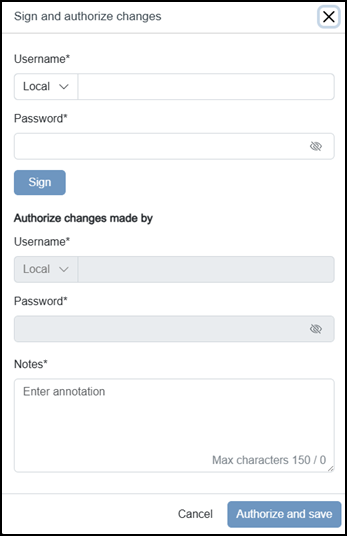
-
Enter your Username and Password, and then select Sign
 :Note - You can only complete this section if you have the Can sign changes permission. If you need to access this function and cannot, please contact your system administrator.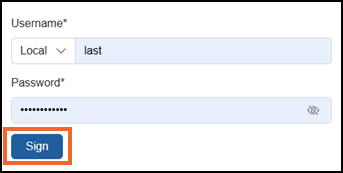
-
The Authorize changes made by 'username' screen displays, enter your Username and Password to authorize the changes.
Note - A different user must complete this section and they must have the Can authorize permission. If you need to access this functionand cannot, please contact your system administrator.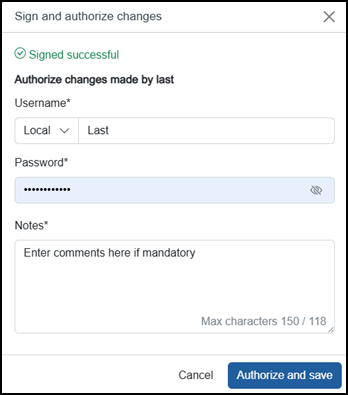
-
Enter any comments in Notes if appropriate.
Note - If Requires Note in Audit management is enabled, a comment is mandatory, if it is not enabled, it is optional. You can only add comments if you have the Can add Audit note permission. If you need to access this option and cannot, please contact your system administrator. -
Select Authorize and save
 .
.
The following additional data records:
-
Users Logging in and out - Each time a user logs into or out of the system the date, time and user details are recorded, for example, '23/04/25 15:32:20 Login by Frederick Bloggs' or '23/04/25 15:49:43 Logout by Frederick Bloggs'.
Note - If a user logs in remotely, the IP address of the remote device/connection is recorded, for example, '23/04/25 15:58:03 Login by (149.121.130.126) Frederick Bloggs'.
Last update - August 2026