Batch
A Batch is a group of process variables, usually collected over time, for a specific manufacturing process. Each Batch record is allocated a traceable reference number and can be set to record additional information, for example, end customer or material used. Many industries collate recorded data by Batch for traceability.
Batches can be started in the following ways:
-
Manually, by an operator
See EPM User Interface Roles for details. -
Automatically, when triggered by a Job, see Jobs for details.
-
Via remote communications, for example, Modbus TCP.
Batches can be:
-
Start/Stop - Batch recording starts when the Batch is started and continues until it is stopped.
-
Continuous - Batch recording starts when the Batch is started and continues until the next Batch is started, or until Batch recording is disabled.
Batches are run on Groups, which contain one or more channels.
The following options are available in EPM Data Management to enable you to set up and manage your Batches:
-
Batch Configuration - Before a Batch can be run, Batch configurations must be defined, see Configuring a Batch for details.
-
Batch Status panel - Displays 'at a glance' details of the Batches currently running on your device, see Understanding the Status Bar for details.
-
Batch Summary screen - Displays a list of current Batches, see Using the Batch Summary Screen for details.
Tip - You can also control Batches from here, including starting, pausing, restarting and stopping them, see Using the Batch Summary Screen for details. -
Live view - From any Live view, select Settings
 - Batch Configuration to open the Batch Configuration screen, or Batch to select a Batch to run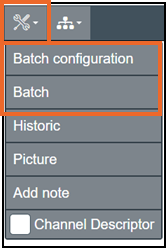
Enabling Batch Recording
To enable Batch Recording on your EPM device:
-
From the EPM User Interface screen, select Options
 - Device and users - Settings: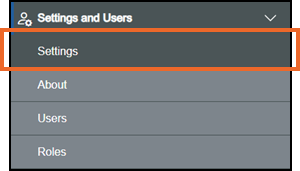
-
The Device Settings screen displays, select Feature Options:
-
The Feature Options pane displays on the right-hand side of the screen. Ensure Batch is set to On:

Archiving
Batch records form a part of your recording history and are included in the normal archiving process to your network, or a removable storage device, via the USB Type C port on the EPM-07 and EPM-15 devices.
To prevent data loss, Batches must be archived on a regular basis. To prevent interruptions to your system, EPM Data Management automatically writes over the oldest .uhh files when it runs out of space, this results in those oldest files being permanently removed. For this reason, you must have a robust archiving strategy.
Last update - June 2026