Configuring a Group MKT Application Channel
A Group Mean Kinetic Temperature (MKT) Application channel outputs a single equivalent isothermal temperature for a selected group of channels, corresponding to the kinetic effects of the measured temperature distribution. Channels without a valid value are ignored, see Criteria for a Valid Value for details.
To access, add and configure a Group MKT Application channel:
From the EPM User Interface screen, select Options  - Functions - Applications:
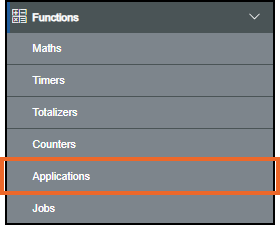
Select from the following options to expand the details:
 Adding a Group MKT Application Channel
-
From the left-hand side of the Applications screen, select Add Application
 :
: -
If you are not already in Configuration lock, the Configuration lock screen displays
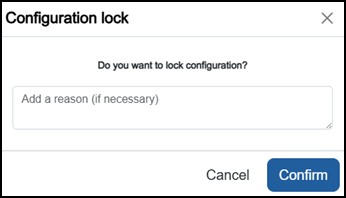
Enter a reason if required and then select Confirm
 . The system configuration is now locked pending the submission of your update and the Configuration Locked
  icon displays on the status bar.Note - Configuration lock does not affect the operation of the EPM device.See Configuration Lock for details.
 -
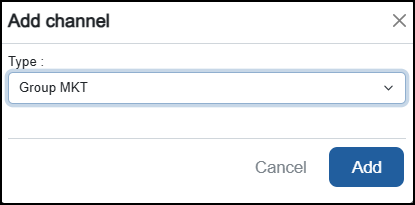
The Add channel screen displays, from Type, select Group MKT from the available list and select Add
 :
:
Configuring a Group MKT Application Channel
-
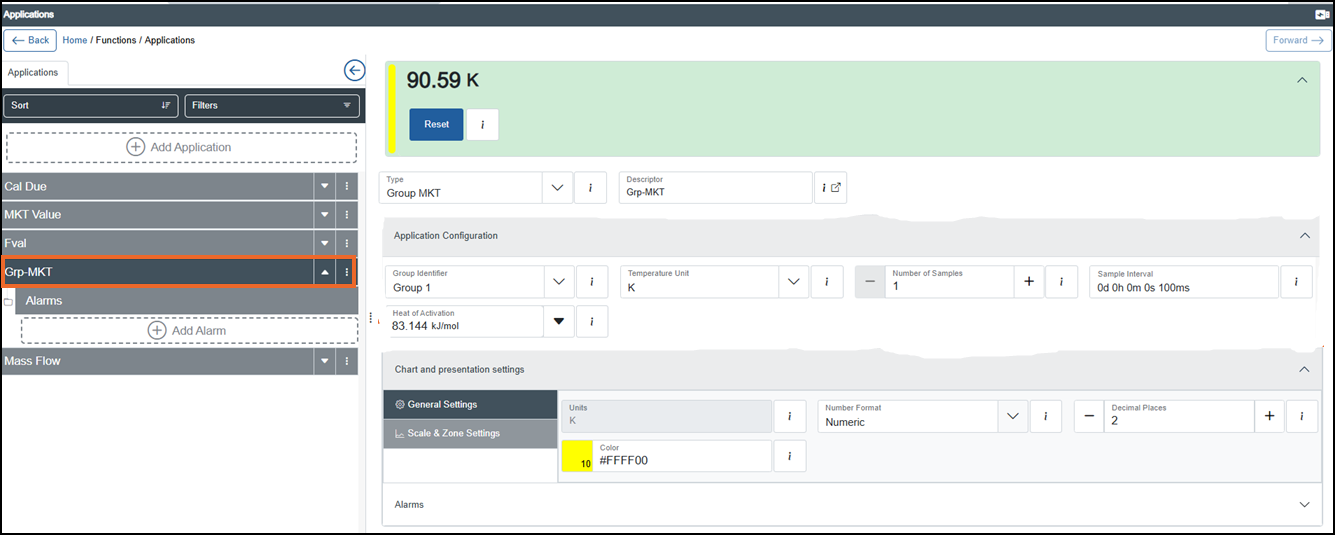
From the left-hand side of the Applications screen, select the Group MKT Application channel required. The Application Configuration section displays on the right-hand side
-
If you are not already in Configuration lock, the Configuration lock screen displays
Enter a reason if required and then select Confirm
. The system configuration is now locked pending the submission of your update and the Configuration Locked icon displays on the status bar.Note - Configuration lock does not affect the operation of the EPM device.See Configuration Lock for details. -
Complete the configuration as required:
-
Type - Defaults to Group MKT.
-
Descriptor - Defaults to Application <n> where n is the next number in sequence from the previous Application channel. We recommend that you enter a meaningful name for the channel (maximum 40 characters), for example, “Grp-MKT” or “Group Thermal MKT”.
Note - This is not case sensitive, for example, 'AbC' is regarded as identical to 'abc'.Tip - When an External link icon displays next to a function’s Descriptor, it indicates that one or more of its parameters are mapped to a Modbus server register table. Select External link to display the Modbus register address, data type and related mapping details, which enables alignment with the exported Modbus register map. See Exporting a Modbus Address Map for details.
 -
Application Configuration - Select Expand
 if it does not expand automatically:
-
Group Identifier - Select a group from the available list. This links the MKT calculation to that group so the Group MKT is derived from the group’s data and reflects its overall storage conditions.
-
Temperature Unit - Select the unit of measurement for the temperature parameters (°C, °F, K or °R)
Centigrade, Fahrenheit, Kelvin or Rankine. -
Number of Samples - Enter the number of time samples to calculate the MKT window length, for example, a one second sampling time, with a MKT of five samples and an interval of five seconds, results in an MKT period of 25 seconds, with a total of 5 inter-samples per MKT sample.
Tip - A higher value means the MKT calculation takes more past samples into account. -
Sample Interval - Enter the time between samples to calculate MKT.
Enter number of days in d, hours in h, minutes in m, seconds in s and milliseconds in ms or use the Up
 and Down
  arrows to set the value. Select Apply
  , or Cancel to exit
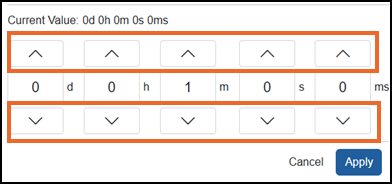 Tip - A single select moves the numbers one at a time, a long hold moves through the numbers quickly.Tip - The Sample Interval, together with the Number of Samples defines the total time span of the MKT window.
 -
Heat of Activation - Defaults to 83.144 kJ/mol
kilojoules per mole, enter the minimum amount of energy required for a chemical reaction to occur. This is the activation energy Ea in the MKT formula.
-
-
Configuring Chart and Presentation Settings
-
From the left-hand side of the Applications screen, select the Group MKT Application channel required. The Chart and presentation settings section displays on the right-hand side.
-
If you are not already in Configuration lock, the Configuration lock screen displays
Enter a reason if required and then select Confirm
. The system configuration is now locked pending the submission of your update and the Configuration Locked icon displays on the status bar.Note - Configuration lock does not affect the operation of the EPM device.See Configuration Lock for details. -
From Chart and presentation settings, select Expand
if it does not expand automatically and complete as required:-
General Settings:

-
Units - Defaults to K (Kelvin).
Tip - The unit displays with the channel value on the Operator panel. -
Number Format - Select either:
-
Numeric - Displays values in decimal format, for example, 12345.6789 displays as 12,345.6789.
-
Scientific - Displays values in scientific notation, useful for very large or very small numbers. Numbers display as a coefficient multiplied by a power of 10, for example, 12345.6789 displays as 1.23456789E+4.
-
-
Decimal Places - Enter the value, or use the Plus
 or Minus
  to set the decimal place (0 to 6).
 -
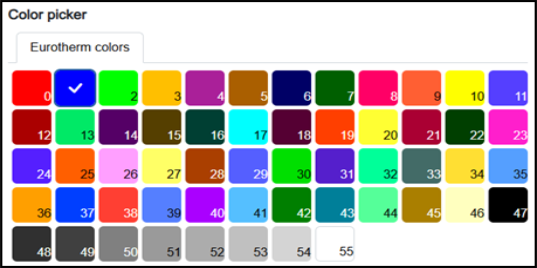
Color - Select a color from one of the 56 available colors:
-
-
Scale & Zone Settings:
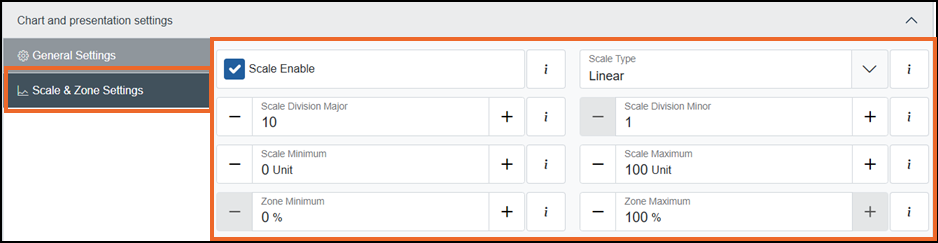
To set the chart scale and zoning for this channel:
-
Scale Enable - Tick to enable scale configuration and specify the scale type and the number of divisions required:
-
Scale Type (available only when Scale Enable is enabled) - Select one of the following options:
-
Logarithmic - Divisions are displayed using a logarithmic scale. This option is suitable for analyzing data spanning multiple orders of magnitude.
-
Linear - Divisions are displayed at equal intervals. This option is ideal for displaying uniformly distributed data:
-
Scale Division Major (available only when Scale Type is Linear) - Enter a value, or use the Plus
and Minus to set the major divisions to be included on the chart (valid range 1 to 20). -
Scale Division Minor (available only when Scale Type is Linear) - Enter a value, or use the Plus
and Minus to set the minor divisions to be included on the chart (valid range 1 to 20).Note - Scale divisions have no impact on a chart grid, they are only for scale. The grid on the chart is defined by the division settings on the group, see Configuring Groups Settings for details.
-
-
-
-
Scale maximum (Unit) - Enter a value, or use the Plus
and Minus to set the upper limit of the scale's range. -
Scale minimum (Unit) - Enter a value, or use the Plus
and Minus to set the lower limit of the scale's range. -
Zone maximum (%) - Enter a value, or use the Plus
and Minus to set the percentage offset for the upper limit of the scale and trendline relative to the top of the chart (valid range 5 to 100). -
Zone minimum (%) - Enter a value, or use the Plus
and Minus to set the percentage offset for the lower limit of the scale and trendline relative to the bottom of the chart (valid range 0 to 95).Note - The minimum value must be less than the maximum value by 5 or more.Tip - The Zone settings offset a scale and its associated trendline relative to the chart grid. This is useful when displaying multiple trends with similar value ranges, which would otherwise overlap and become difficult to distinguish. For example, several digital trends switching between 0 and 1 can overlap, making them difficult to distinguish unless each is defined a different Zone.
-
-
 to configure an alarm on this channel, see Configuring an Alarm for further details.
Once complete, select Review pending changes  screen to review updates to the configuration, and submit them. See Reviewing and Submitting Changes for details if required.
Last update -July