Available Job Sources
This is a list of the available Job sources and the criteria required for each
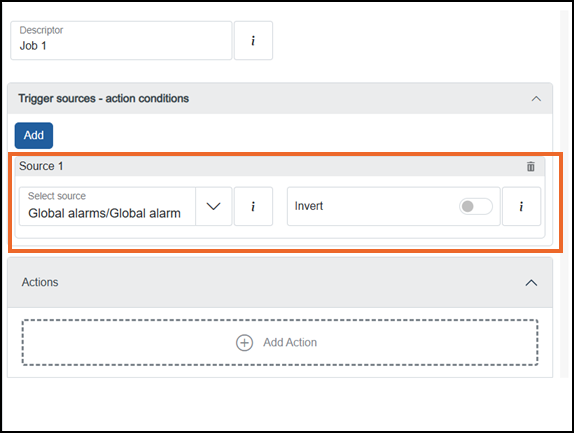
Select from the following options to expand the details:
 .
. Additional triggers
Select from the following options to expand the details:
Scheduled trigger
To trigger this Job according to a specified time frame, complete as required:
-
Clock Source - Defaults to Local Time, select Coordinated Universal Time (UTC) from the available list if required.
-
Month - Select the month from the available list.
-
Day - Select the day of the month or day of the week from the available list.
-
Hour - Select an hour of the day from the available list.
-
Minute - Select the minute of an hour from the available list.
-
Second - Select the second of a minute from the available list.
Channel value trigger
To trigger this Job from the input of a specified channel, complete as required:
-
Input - Select the channel to trigger the Job from the available list.
-
Type - Select from:
Absolute High
The Job triggers when the selected channel signal exceeds the Absolute Threshold. Additional details must be defined:
-
Absolute Threshold - Enter a fixed value.
Absolute Low
The Job triggers when the selected channel signal value drops below the Absolute Threshold. Additional details must be defined:
-
Absolute Threshold - Enter a fixed value.
Deviation Band In
The Job triggers when the selected channel signal value enters the specified range Deviation Reference ±(Deviation Threshold+ Hysteresis). Additional details must be defined:
-
Deviation Reference (Unit) - Enter a fixed value, this should be the center of your acceptable range.
-
Deviation Threshold (Unit) - Enter the acceptable deviation value either side of the Deviation Reference creating the band range.
Deviation Band Out
The Job triggers when the selected channel signal value leaves the specified range Deviation Reference ±(Deviation Threshold+ Hysteresis). Additional details must be defined:
-
Deviation Reference (Unit) - Enter a fixed value, this should be the center of your acceptable range.
-
Deviation Threshold (Unit) - Enter the acceptable deviation value either side of the Deviation Reference creating the band range.
Deviation High
The Job triggers when the selected channel signal value is above the Deviation Reference + (Deviation Threshold+ Hysteresis). Additional details must be defined:
-
Deviation Reference (Unit) - Enter a fixed value, this should the ideal value.
-
Deviation Threshold (Unit) - Enter the acceptable deviation value above the Deviation Reference.
Deviation Low
The Job triggers when the selected channel signal value is below the Deviation Reference - (Deviation Threshold+ Hysteresis). Additional details must be defined:
-
Deviation Reference (Unit) - Enter a fixed value, this should the ideal value.
-
Deviation Threshold (Unit) - Enter the acceptable deviation value below the Deviation Reference.
Rising Rate of Change
The Job triggers when the selected channel signal value changes by more than the specified Rate within the specified period. A first order filter
A first order filter, also known as a low pass filter, is typically used to help remove 'noise' (not just electrical) from a process signal and smooth the value. time can be set to remove the effects of sudden, but short-lived changes, such as noise spikes on the signal. Additional details must be defined:-
Rate Threshold - Enter the maximum rate of change acceptable.
-
Rate Time Unit - Select the time unit to apply to the above threshold.
-
Rate Filter Time - Enter a first order filter time frame to apply to the above change rate in order to reduce the incidence of nuisance Alarms in the event of spikes in process values arising from noise.
Note - Ensure the time constant of the filter is large enough to remove the undesired noise but small enough not to suppress real underlying dynamic behavior of the process signal.Tip - It is best practice to address 'noise' at the source wherever possible, for example, by considering the type and position of the measurement sensor.
Falling Rate of Change
The Job triggers when the selected channel signal value changes by more than the specified Rate within the specified period. A first order filter
A first order filter, also known as a low pass filter, is typically used to help remove 'noise' (not just electrical) from a process signal and smooth the value. time can be set to remove the effects of sudden, but short-lived changes, such as noise spikes on the signal. Additional details must be defined:-
Rate Threshold - Enter the maximum rate of change acceptable.
-
Rate Time Unit - Select the time unit to apply to the above threshold.
-
Rate Filter Time - Enter a first order filter time frame to apply to the above change rate in order to reduce the incidence of nuisance Alarms in the event of spikes in process values arising from noise.
Note - Ensure the time constant of the filter is large enough to remove the undesired noise but small enough not to suppress real underlying dynamic behavior of the process signal.Tip - It is best practice to address 'noise' at the source wherever possible, for example, by considering the type and position of the measurement sensor.
-
-
Absolute Threshold - Select a channel as the input for the Absolute Threshold, or enter a value as required.
-
Hysteresis - This eliminates fluctuating triggers if, for example, the signal value is hovering around the trigger point.
-
On-Delay time - Use the up and down arrows, enter number of days in d, hours in h, minutes in m, seconds in s and milliseconds in ms. Select Apply
 to save.
 -
Off-Delay time - Use the up and down arrows, enter number of days in d, hours in h, minutes in m, seconds in s and milliseconds in ms. Select Apply
to save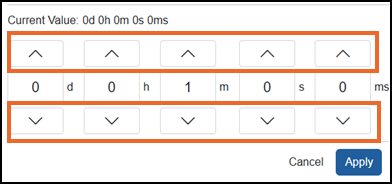
Alarms (Process)
To trigger this Job when a specific Alarm on a specific channel is triggered, select the channel/Alarm required from the available list.
Alarms (Process) unacknowledged
To trigger this Job when a specific Alarm on a specific channel is triggered but is not yet acknowledged, select the channel/Alarm required from the available list.
 to trigger the Job on an Acknowledged Alarm. Should be used in conjunction with an additional Timer channel source, see Timers for detailsArchive
To trigger this Job when an archive status matches one of the following, select as appropriate:
-
Archive media limit - The destination of your archive is full.
-
Archive failed - Your archive has failed.
-
Archive completed - Your archive is complete
Batch paused
To trigger this Job when a specific batch is paused, select the batch required from the available list.
Batch reset
To trigger this Job when a specific batch is reset, select the batch required from the available list.
Batch running
To trigger this Job when a specific batch is running, select the batch required from the available list.
Batch start
To trigger this Job when a specific batch starts running, select the batch required from the available list.
Batch stop
To trigger this Job when a specific batch stops running, select the batch required from the available list.
Channel alarm
(Any)
To trigger this Job when any Alarm on a specific channel is triggered, select the channel required from the available list.
Channel alarms unacknowledged (Any)
To trigger this Job when any Alarm on a specific channel is triggered but is not yet acknowledged, select the channel required from the available list.
Counter on target met
To trigger this Job when a specific counter value is met, select the counter required from the available list.
Digital Input Channel (I/O)
Select from:
-
Active - To trigger this Job if the digital input changes to active.
-
Inactive - To trigger this Job if the digital input changes to inactive.
Global alarms
Selected by default, Select from:
-
Global alarm - To trigger this Job when any Alarm on any channel is triggered.
-
Global alarms unacknowledged - To trigger this Job when any Alarm on any channel is triggered but is not yet acknowledged.
Tip - Should be used in conjunction with an additional Timer channel source, see Timers for details.
Group alarms
To trigger this Job when a specified group Alarm is triggered, select the group required from the available list.
Group alarm unacknowledged
To trigger this Job when a specified group Alarm is triggered and not yet acknowledged, select the channel required from the available list.
System alarms
To trigger this Job when a specified system Alarm is triggered, select from the available Alarm list:
-
Battery Low - Indicates the Real Time Clock (RTC) battery has low power, no power or is missing, see Replacing the Real Time Clock (RTC) Battery for details.
-
RTCFail - Indicates failure with the RealTime Clock (RTC) has been detected.
-
NtpSyncFail - Indicates repeated attempts to match time with your (Simple) Network Time Protocol ((S)NTP) server did not succeed.
-
Power Up - Indicates when the system has powered-up.
-
USB Unsupported - Indicates an unsupported universal serial bus (USB) device has been detected.
Timer complete
To trigger this Job when a specified Timer completes, select the timer required from the available list.
Timer holds
To trigger this Job when a specified Timer is held, select the timer required from the available list.
Timer reset
To trigger this Job when a specified Timer is reset, select the timer required from the available list.
Timer start
To trigger this Job when a specified Timer starts, select the timer required from the available list.
Totalizer on overflow
To trigger this Job when a Totalizer target is reached, select the totalizer required from the available list, see Totalizers for details.
To remove a source:
-
From the Job required, locate the source no longer required and select Delete
 .
. -
TheRemove sourcescreen displays, selectConfirm
 :
: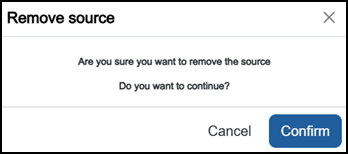
The source is removed.
Last update - May 2026